Prevent Screenshot Of Your Documents
Use HelpRange to prevent copying of your materials. Prevent making screenshot of your documents by using HelpRange's Android, iPhone or iPad apps or special screenshot mask for your documents
Thousands of companies (big and small) who trusted HelpRange include


See it in HelpRange
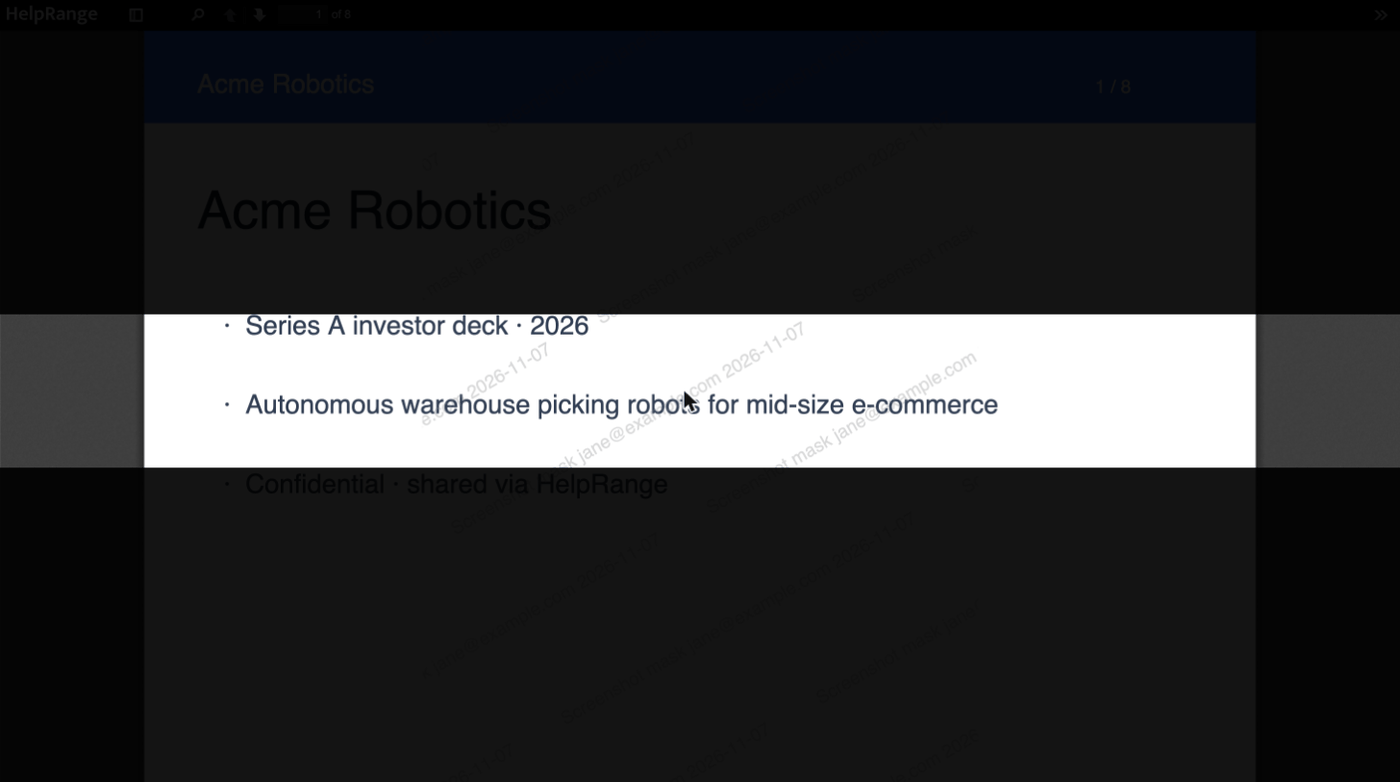
Screenshot mask in the browser
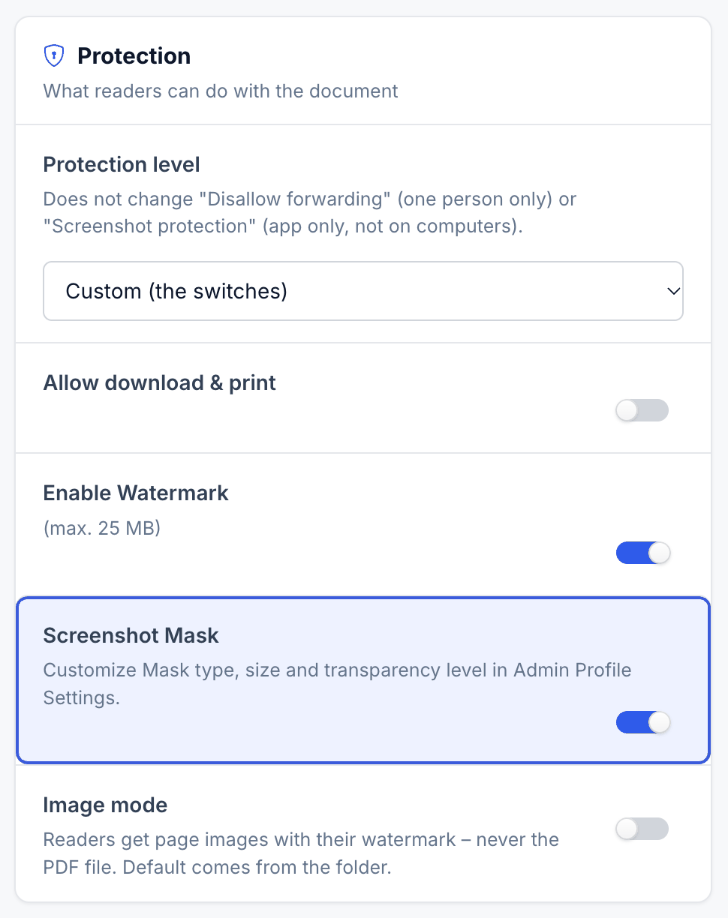
The mask darkens the page except a strip around the reader's pointer, so one screenshot captures only a few lines – and with a watermark each strip carries the reader's e-mail. For full blocking, “Screenshot Protection” opens the document only in the HelpRange app for iPhone, iPad and Android.
Why HelpRange
One price for your whole team
Pro ($39), Max ($87) and Unlimited ($174) are monthly prices per team, not per user. Guests, readers and clients you share with are never counted. See pricing
$199 for one deal
The Deal Room Pass gives you all Unlimited features for 90 days with one payment – no subscription to cancel. How the Deal Room Pass works
No sales call
Sign up, upload and share in minutes. Prices are public and you pay by card.
Protect and sell PDFs in one tool
Each buyer gets a personal copy with their e-mail watermarked on every page and download blocked. Revoke access with one click after a refund. How it works
When to use it
- Documents whose value is the content itself – formulas, designs, research, exam materials.
- Readers you do not know personally, such as buyers of a paid PDF.
- Sensitive pages inside a larger data room.
Good to know
- Screenshot protection is on Max ($87 per team per month); the browser mask leaves only a strip around the pointer readable.
- No technology stops a photo of the screen – pair screenshot protection with a watermark so any capture names the reader.
Questions
Can you really prevent screenshots of a document?
Not completely. HelpRange makes screenshots much less useful (the mask shows only a few lines at a time, the apps block capture), and the watermark makes any photo traceable.
Does screenshot protection work on phones?
In HelpRange’s Android, iPhone and iPad apps; in a mobile browser the screenshot mask is used instead.
How does it work?
Goodbye attachments, hello links
1. Upload your document
2. Share link to your document or data room:
Update file even after you've already sent it.
Supported document types: PDF, PowerPoint (.pptx, .ppt), Word (.docx, .doc), Images (bmp, jpeg, jpg, png, svg, tiff, webp), Text (rtf, txt), Spreadsheet (xls(x), csv, ods, xlr). Supported "download only" file types: any other file format, including videos.
Increase security
The Most Advanced Documents Access Control
- Share only with specific email addresses
- Block the ability to download and print
- Disallow forwarding
- Enable Watermarking
- Screenshot Protection (proprietary algorithm)
- Restrict access only for set of IPs
- Let only one user to view at the same time
- Limit number of views
- Use end-to-end encryption
- Update your document after you hit send (any time)
- Revoke access to your file at any time
- Set a password and an expiration date
Get actionable feedback
The Most Advanced Documents Tracking & Analytics
- Check IP, country, referral link of document visitor
- Get alert when someone visits your file
- Heatmaps: track where people pay attention
- Track for how long and what pages were read
- Add UTM codes to links and track your sources
- Require email for viewing your document
Lead Magnets
Build landing page for your documents
- Put landing page in front of your documents
- Use your own company domain name
- Customise your landing page: logo, colors, fields
- Customize language for landing page
- Gather contact info of your files' visitors
- Get email address or phone number
- Get first name or last name
- Get visitors' company name
Match your branding
Customise people impression
- Use logo of your company
- Use your domain name
- Set colors to match your branding
- Embed document viewer on your website
- Install any widget inside document viewer
- Let people chat with you from your documents
Automate your process
Use our REST API to automate documents sharing
- Create secure file links for your customers automatically
- Create unique passwords for each of your customers
- Set expiration date depending on your customer's plan
- Let only one customer to view document at the same time
What customers are saying
Our Sales Team is incredibly excited about HelpRange. We share our initial document offers and other marketing materials with HelpRange and it provides so much value by showing in-depth insights about clients’ behaviors. It gives a lot of information how to qualify a given lead and anticipate the sales potential of a given prospect.

I am already using it for one of my markets. We send out quotations to B2C customers. The decision making process can take a long time (2-3 months on average) so it is very important for us to know when the customer is close to making a decision. That is also why I need to know every time they open it up, and I am asking for the special set up again. Thanks again for making a great software.
I'm in love with this software - it's extremely high quality. Using it for a client proposal; it's great to be able to white label it w/ the iFrame.
Great tool. We love it. We'll use to share our pitch to different investors and interested people.
HelpRange has been featured on: Product Hunt · Hacker News
Pricing
Free plan · Pro $39 · Max $87 · Unlimited $174 per team per month
- No limit for number of your customers
- No limit for documents downloads/views
- No limit for documents count
GDPR
HelpRange is GDPR-compliant. HelpRange is GDPR-compliant, allowing users to request file retrievals, manage storage dates, request destruction, run reports, and see a full audit trail of any physical activity with their documents.
Security
Security and Privacy as Top Priority. We take security and privacy of your data as our top priority. HelpRange server-side encryption uses one of the strongest block ciphers available, 256-bit Advanced Encryption Standard (AES-256), to encrypt your data.
Try it on your own documents
3-day free trial, then a free plan. No credit card required.
Start free trial