Secure client portal for confidential documents
Short answer: A client portal for documents is a private, sign-in-protected space where each client finds the files you send them – instead of e-mail attachments. In HelpRange it is a data room per client (or one room with folder access per person): clients sign in with a one-time code, get one e-mail when new documents arrive, read them view-only with their e-mail as a watermark, and you see who opened what. One price per team, no per-client fees.
For firms that send the same people confidential documents every month: reports, statements, contracts, board packs, member documents. No more attachments that sit in inboxes for years and get forwarded – each client signs in, reads what is theirs and you know they did.
No credit card. Your clients need no account. Last updated .
Who uses it
Accountants and bookkeepers
Monthly reports, annual accounts, tax returns and payroll summaries for each client – in their own folder, with an e-mail when the new month is in.
Advisers and consultants
Board packs, valuations and recommendations that should not live in an inbox forever – view-only, with the client’s e-mail on every page.
Law firms
One room per matter or client: contracts, drafts and evidence, an NDA before the first document opens and a dated record of what the client saw.
Funds and membership organisations
Quarterly reports and capital calls to each LP, or member documents to hundreds of members – added from a CSV, each limited to their folders.
Client portal for accountants and tax preparers
For a practice, the portal is where each client finds their monthly reports, payroll summaries, annual accounts and tax returns – and where you can show they opened them. HelpRange does the document side only: there is no billing or invoicing, no task management or deadline tracking and no connection to your accounting or tax software, so keep your practice tool for those.
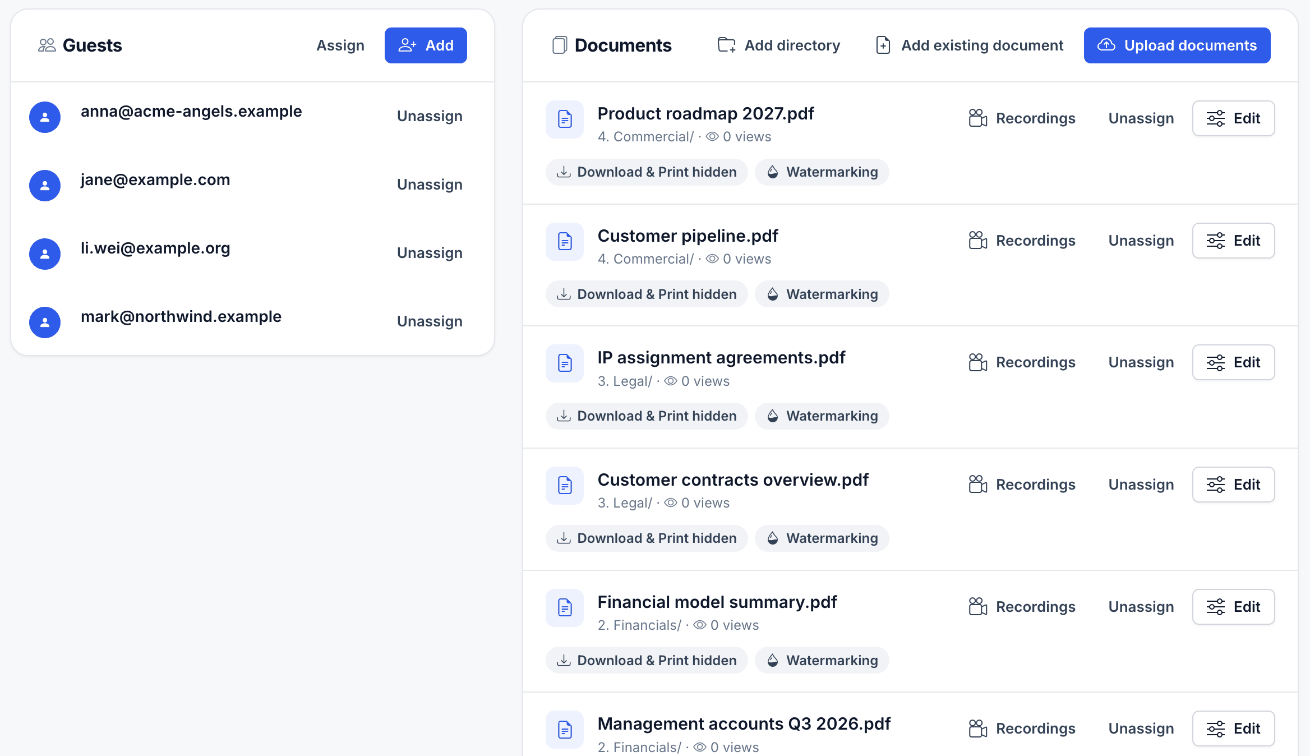
- A folder or a room per client. One data room with a folder per client and folder access per person (Pro, up to 3 rooms), or a room per client on Max. Folders nest up to 5 levels: “Client › 2026 › 11 November › Payroll”.
- All clients added at once. “Add many” takes your client list as a CSV or pasted text – e-mail, name, access until and folders – and sends the invitations now or later. Clients sign in with a one-time code; no password.
- One e-mail when the month is in. Tick “E-mail the guests who can see it” on upload: each client gets one digest per room, at most one an hour, listing only their documents.
- Drafts view-only, finals downloadable. Download and print are set per document: send the draft return view-only for review and allow the download of the final copy. Pro and up.
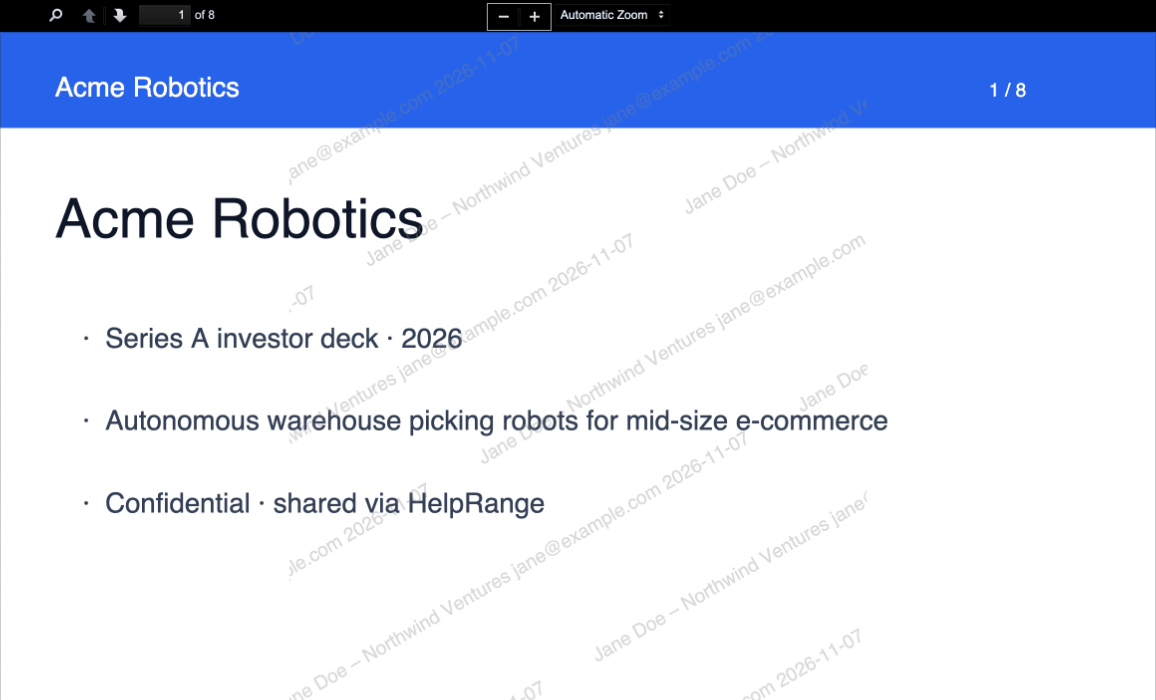
- Their e-mail on every page. A watermark with the reading client’s e-mail on every page, so a forwarded statement shows whose copy it was. Pro and up.
- NDA or engagement terms first. Clients accept your confidentiality terms online before the first document opens, with a PDF record for both sides. Pro and up.
- Proof it was opened. The guest activity report lists each client’s last login, the documents opened and the reading time, with CSV and Print / PDF.
- Clients send documents back. File requests let clients upload receipts, bank statements and signed forms into the folder you choose. Max and up.
How the client portal works
Four steps, set up once. After that, delivering the next month’s documents is an upload and one tick.
A room per client – or a folder per client
Create a data room for each client, or one room with a folder per client and folder access per person: a client limited to their folder sees only it (with its subfolders) – not even the names of the other folders. Folders nest up to 5 levels and are numbered 1, 1.2, 1.2.3, so “2026 › 11 November › Payroll” stays tidy.
Add the people in one go
“Add many” on the room’s Guests card takes a CSV or a pasted list – e-mail, name, access until and folders – shows a preview with every row’s status, then sends the invitations now or later. Clients sign in with a one-time code sent to their e-mail, or with Google or Microsoft – there is no password to forget.
Upload – they get one e-mail
When you upload or add documents, tick “E-mail the guests who can see it”. Each client gets one “new documents” e-mail per room – at most one an hour, listing only the documents they can open – with a one-click unsubscribe.
Know who read it
Every open is recorded per person and page. The guest activity report shows each client’s last login, the documents opened and the reading time – with a CSV export and Print / PDF when you need to show it.
Control over every document you send
NDA before access
Clients accept your confidentiality terms online before the first document opens; both sides get a PDF record. Pro and up.
Watermark with the client’s e-mail
On every page they read – a forwarded screenshot shows whose copy it was. Pro and up.
View-only
Downloads and printing off for the documents that should not leave the room. Pro and up.
Access until
An end date per client, set when you add them or in the CSV; revoke access any time.
Device limit per guest
A client’s login works on the number of devices you allow – a shared login on one more device is refused and you get an e-mail. Max and up.
Clients upload too
File requests let clients send their documents back into the folder you choose. Max and up.
What customers say
Real words from HelpRange customers – from G2, Capterra and their e-mails to us, quoted as written, not written by AI.
“… helped us share documents and limit access with our over seas partners … it was easy to onboard users and get them up and running”
“its just what I was looking for! I am a nutritionist and I was searching for a way to share my meal plans with clients in a way that protects my intellectual property from being easily stolen.”
“I will take your suggestions to heart over the next days and I am sure that you found a new customer. The fact that you reached out definitely made a difference, thank you for that.”
“I needed a secure DRM to email out proofs securely. … I decided to give it a try and absolutely loved it.”
“We are very happy with your software as it provides us a solution fit for our purposes. … The anti-screenshot feature is wonderful!”
“I'm in love with this software - it's extremely high quality. Using it for a client proposal; it's great to be able to white label it w/ the iFrame.”
“It is a great platform though, I will sign up again if I have a need again in the future.”
“great tool, I'm using it and I love how easy and straight to the point is!”
“I love the services that Helprange provided … I was using Helprange for people to review a book … I will tell others about your service”
“Easy to understand and use. No fluff. The tool does exactly what it says it does. Customer support is quick and responsive.”
“Great tool. We love it and will upgrade soon. We'll use to share our pitch to different investors and interested people.”
“I like how easy it is to set up Virtual Data Room, I like also way in which I can protect my documents from unwanted screenshots”
“This is an absolute God-send as I start my journey of pitching a new TV series. I can't thank you guys enough.”
“Fantastic customer support … Only useful features, no fuss”
“Your site was recommended to me from a Venture Capitalist who recommended I use a secure link to share information … For small business, your services appear excellent & come recommend.”
“Easy to use, simple interface, does what it says on the tin”
“I've used many similar systems for a long time. However, yours is much better than others. Because you've already thought of and implemented many things users might want, which is truly valuable.”
“Understand which of my clients are reading the deck and statistics around that.”
“HelpRange is a great tool which helps us understand better how our potential clients respond to the proposals we send them.”
“Thank you for the help with the issue and for the fast and excellent service. … I have just tried changing the logo in the settings and it did exactly what I wanted.”
“It has made it much easier to understand how people engage with PDF documents I created.”
“We really enjoy your solution so I am happy that we can keep using it!”
What it costs
One price for the whole team – no per-client, per-guest or per-user fees.
| Pro | $39 per team a month | Up to 3 data rooms – e.g. one room with a folder per client – with folder access per person, bulk guests, new-document e-mails, NDA before access, watermarks and view-only. |
| Max | $87 per team a month | Unlimited data rooms (one per client), file requests from clients, Q&A, device limit per guest, document acknowledgement and AI answers for guests. |
| Unlimited | $174 per team a month | Everything in Max plus your own domain, single sign-on for your team and an approval step before clients see new documents. |
Client portal – questions
What is a secure client portal for documents?
A private space where each client signs in to read the documents you send them, instead of receiving attachments. In HelpRange every client is a guest of a data room: they confirm their e-mail with a one-time code, see only what you give them access to, and every open is recorded.
Can each client see only their own documents?
Yes. Give each client their own data room, or put them in one room and limit each person to their folders. A limited client sees only those folders with their subfolders – documents at the top of the room and other folders, including their names, stay hidden.
Do clients get an e-mail when I add new documents?
Yes, when you tick “E-mail the guests who can see it” on upload (or turn it on as the room’s default). Each client gets one e-mail per room, at most one an hour, listing only the documents they can open, with a one-click unsubscribe.
Can I add many clients or members at once?
Yes. “Add many” takes a CSV or a pasted list with e-mail and, optionally, name, access-until date and folders. You see a preview of every row first and choose to send the invitations now or later.
Do my clients need an account or a password?
No. They confirm their e-mail with a one-time code, or sign in with Google or Microsoft.
What does it cost?
Pro is $39 per team a month with up to 3 data rooms – enough for one client room with a folder per client. Max ($87) adds unlimited rooms and file requests so clients can upload documents back. There are no per-client or per-user fees, and the free trial includes data rooms.
Is it a replacement for my practice-management software?
No. HelpRange has no tasks, billing or client chat. It is the confidential, tracked way to deliver documents; keep your practice tool for the rest.
Send next month’s documents through a portal
Sign up, choose “Confidential documents to clients or members”, create a room, add your clients from a list and upload. The free trial includes data rooms.
Related: Fund data room and LP reporting · Data room for law firms · Secure document sharing · NDA before access · Pricing