Send a PDF and see when it is read
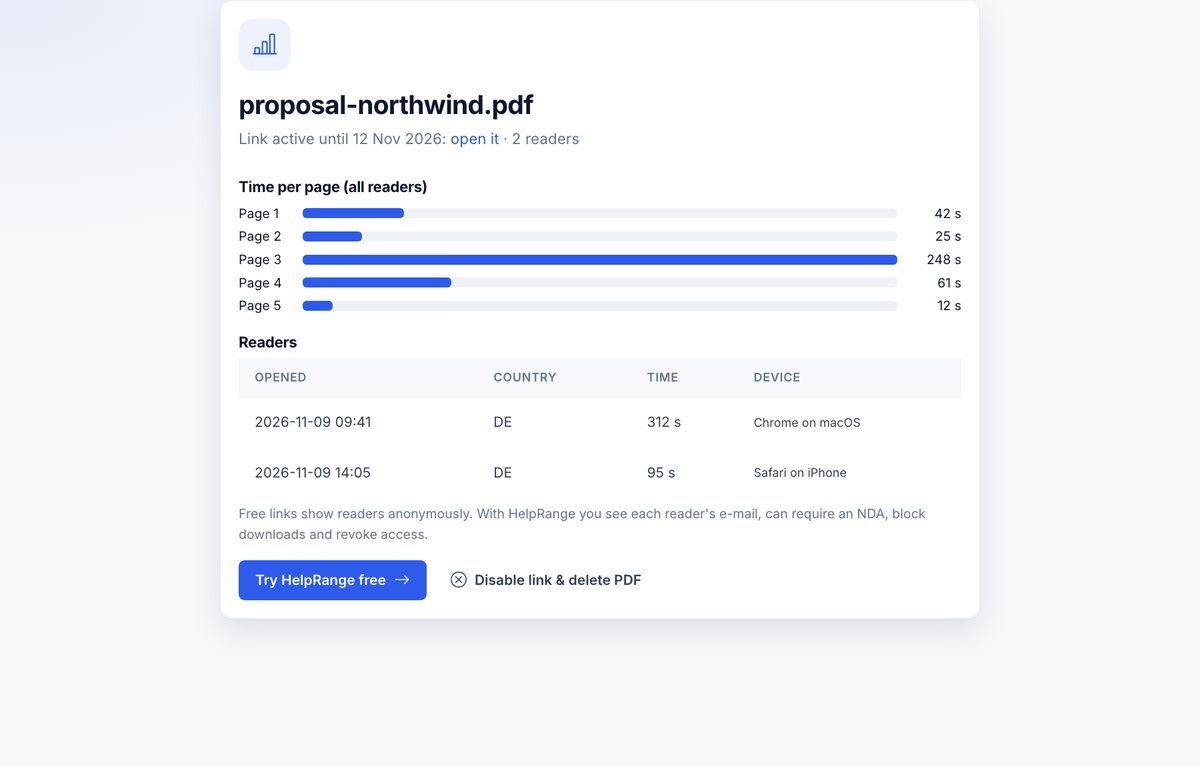
Upload a PDF, confirm your e-mail and get a link to share. We e-mail you when someone opens it and show how long each page was read.
How it works
Upload your PDF
Confirm your e-mail with a one-time code.
Copy the link
Send it by e-mail, chat or LinkedIn – the PDF opens in the browser, no download needed.
See when it is read
We e-mail you when someone opens it and show how long each page was viewed.
Free for 3 days. With HelpRange: as long as you want, with names.
A HelpRange account shows every reader's e-mail, watermarks each page, can require an NDA and keeps links working as long as you want – plus data rooms for many documents.
Knowing that a proposal, deck or offer was opened – and which pages got attention – tells you when to follow up and what to talk about. This free tool gives you that for one document; HelpRange does it for all of them, with names.
Why a link instead of an attachment
An attachment disappears into the recipient’s inbox: you do not know whether it was opened, read to the end or forwarded. A link opens the PDF in the browser and tells you when it was read and which pages got attention – useful for proposals, CVs, pitch decks and sales documents, where the follow-up matters.
Follow up when the alert arrives: a call the same day a proposal is opened is far more likely to reach someone who is thinking about it.
What the free link includes
- An e-mail when a new reader opens it, and page-by-page reading time.
- PDFs up to 5 MB and 30 pages; readers see the pages in the browser and cannot download the file.
- The link works for 3 days; then it stops and the file is deleted.
- Readers are anonymous on the free link – you see that the document was read, not by whom.
Need a fixed end date or a view limit? Use the expiring PDF link. Sending a spreadsheet? Try the Excel link.
Example: following up on a proposal
You send a proposal link on Monday. On Wednesday you get an e-mail: someone opened it, and the stats page shows four minutes on the pricing page and ten seconds on the case studies. That is the moment to call – and you know to talk about price, not references.
Send a PDF and see when it is read – questions
Do I need an account?
No. You confirm your e-mail with a code; the link and the stats page are e-mailed to you.
How long does the link work?
3 days. You can disable it earlier from the stats page – the PDF is deleted then.
Can readers download or copy the PDF?
Readers see page images in the browser – no download button and no text to copy.
What are the limits?
PDFs up to 5 MB and 30 pages, one active link per e-mail address.