Document Analytics
Use HelpRange to find out how people interact with your documents, get alerts to understand when people open your documents
Trusted by 8,100+ teams






See it in HelpRange
Heatmaps show where readers focus
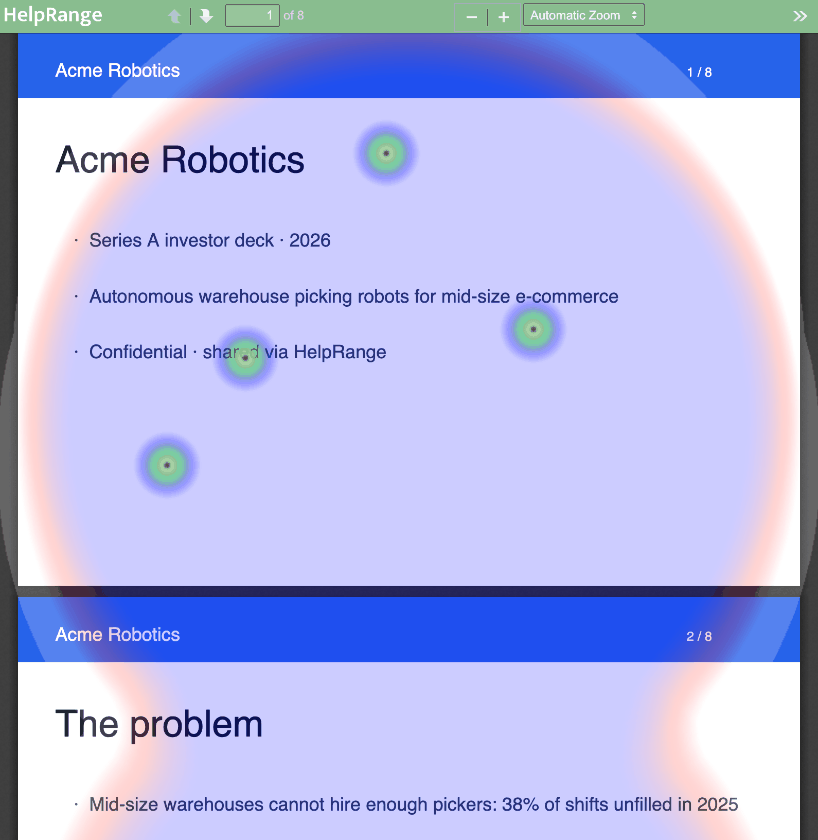
The heatmap marks the parts of each page readers looked at and clicked, summed over all visits.
Every visit, with e-mail and device
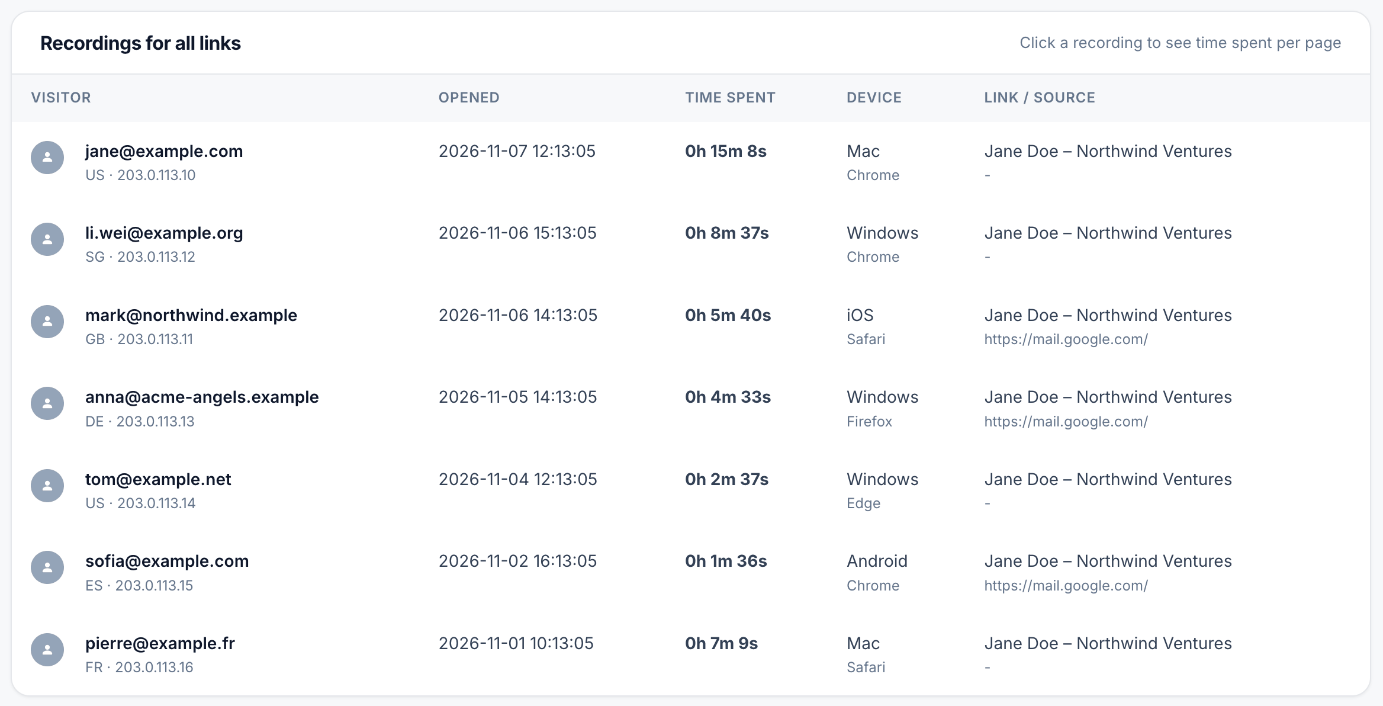
See who opened the document, when, for how long, from which country and device, and through which link.
Watch every visit like a video
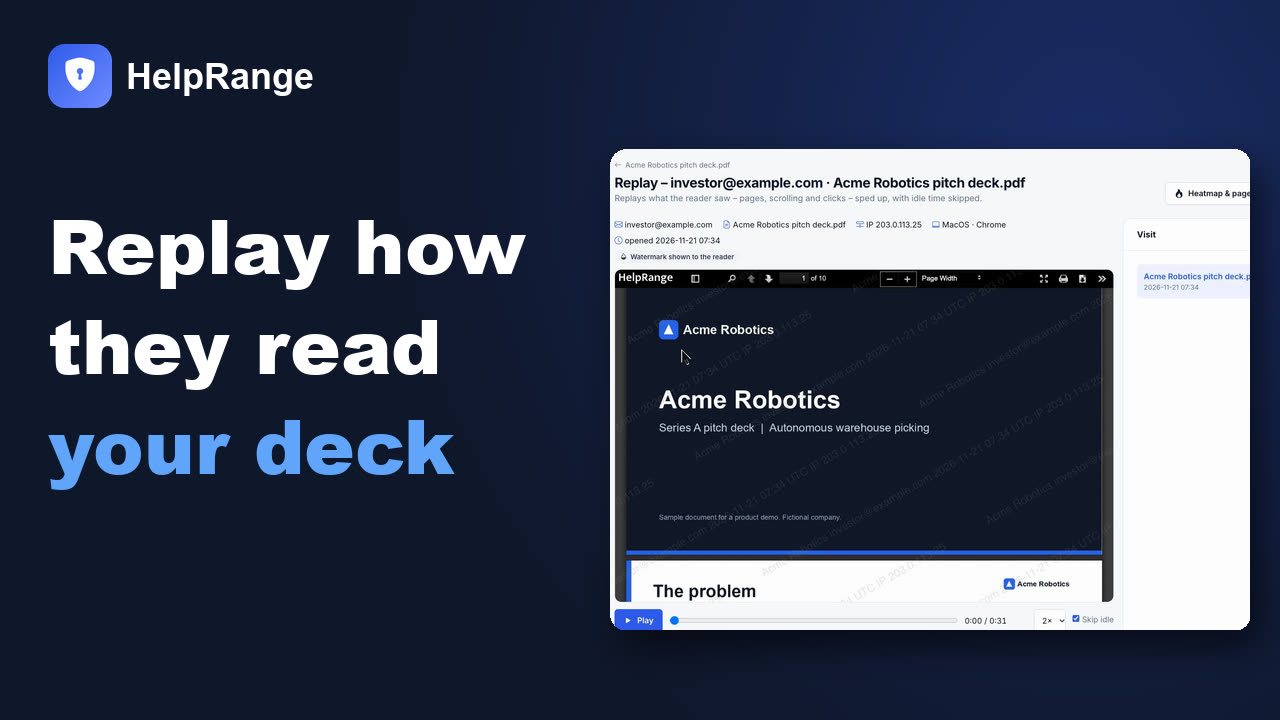
Every visit to a shared document is recorded in the viewer – pages, scrolling, clicks and tab switches. Open it in your panel and press Play. Play at 2×, 4× or 8×; long pauses are skipped, so a 20-minute read takes a minute.
Example visit replay: the reader opens the investor deck, reads pages 1 to 7, spends the longest on page 3, switches to another tab once and leaves after page 7.
Example recording with a made-up visitor and document.
Where they spent time and where they dropped off
Follow the reader page by page: what they read first, where they slowed down, what they skipped – and the last page they reached before leaving.
Clicks and tab switches
See where they clicked and when they left the tab – e.g. to check your numbers in a spreadsheet.
Who, where, which device
E-mail (after verification or NDA), country, IP, device and the time of the visit next to the player.
Everything about document tracking
Features
Guides
Free tools
Why HelpRange
One price for your whole team
Pro ($39), Max ($87) and Unlimited ($174) are monthly prices per team, not per user. Guests, readers and clients you share with are never counted. See pricing
$299 for one deal
The Deal Room Pass gives you all Unlimited features for 90 days with one payment – no subscription to cancel. How the Deal Room Pass works
No sales call
Sign up, upload and share in minutes. Prices are public and you pay by card.
Data rooms for deals
Fundraising, M&A and due diligence: folders, Q&A, AI answers and an activity report for every guest. Virtual Data Rooms
When to use it
- Following up on a proposal or pitch deck at the right moment – when the client opens it, not a week later.
- Seeing which pages investors or buyers actually read (pricing? the team slide?) and which they skip.
- Measuring which version of a deck or guide keeps readers longest.
Good to know
- Page-by-page analytics, heatmaps and alerts (e-mail or Slack) are in Pro ($39 per team per month).
- Readers who are not asked for an e-mail are counted as anonymous visits, with country, device and link.
Questions
Can I see how long someone spent on each page of my PDF?
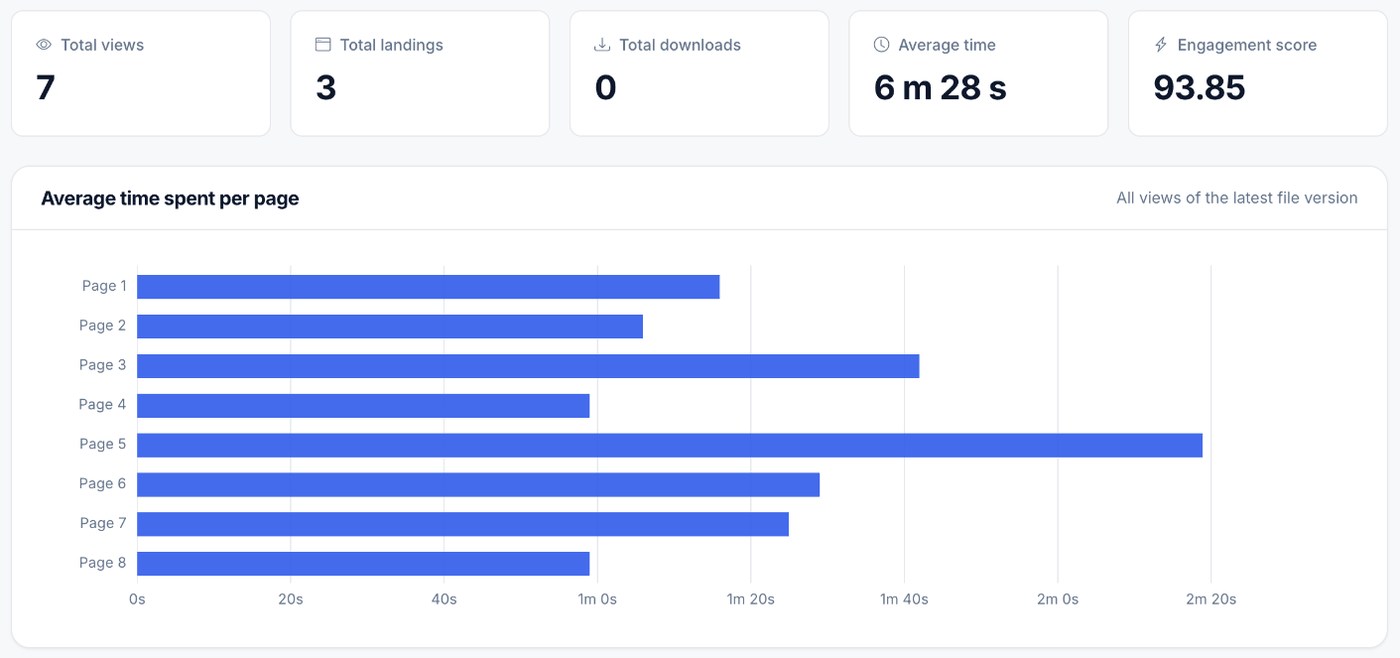
Yes – every visit shows the time spent on each page, and the document statistics sum it up for all readers.
Do I get notified when someone opens my document?
Yes, by e-mail or in Slack, the first time each reader opens it.
Can I watch how someone read my document?
Yes. Every visit is recorded in the viewer – pages, scrolling, clicks and tab switches – and you can replay it in your panel like a video, with the reader’s e-mail (when verified), country, IP and device next to it.
Is the reader recorded on camera or their screen?
No. Only the position in your document (page and scroll), clicks inside the viewer and whether the tab was visible – nothing else on their computer.
How does it work?
Goodbye attachments, hello links
1. Upload your document
2. Share link to your document or data room:
Update file even after you've already sent it.
Supported document types: PDF, PowerPoint (.pptx, .ppt), Word (.docx, .doc), Images (bmp, jpeg, jpg, png, svg, tiff, webp), Text (rtf, txt), Spreadsheet (xls(x), csv, ods, xlr). Supported "download only" file types: any other file format, including videos.
Increase security
The Most Advanced Documents Access Control
- Share only with specific email addresses
- Block the ability to download and print
- Disallow forwarding
- Enable Watermarking
- Screenshot Protection (proprietary algorithm)
- Restrict access only for set of IPs
- Let only one user to view at the same time
- Limit number of views
- Use end-to-end encryption
- Update your document after you hit send (any time)
- Revoke access to your file at any time
- Set a password and an expiration date
Get actionable feedback
The Most Advanced Documents Tracking & Analytics
- Check IP, country, referral link of document visitor
- Get alert when someone visits your file
- Heatmaps: track where people pay attention
- Track for how long and what pages were read
- Add UTM codes to links and track your sources
- Require email for viewing your document
Lead Magnets
Build landing page for your documents
- Put landing page in front of your documents
- Use your own company domain name
- Customise your landing page: logo, colors, fields
- Customize language for landing page
- Gather contact info of your files' visitors
- Get email address or phone number
- Get first name or last name
- Get visitors' company name
Match your branding
Customise people impression
- Use logo of your company
- Use your domain name
- Set colors to match your branding
- Embed document viewer on your website
- Install any widget inside document viewer
- Let people chat with you from your documents
Automate your process
Use our REST API to automate documents sharing
- Create secure file links for your customers automatically
- Create unique passwords for each of your customers
- Set expiration date depending on your customer's plan
- Let only one customer to view document at the same time
What customers are saying
Our sales team is incredibly excited about HelpRange. We share our first offers and other marketing materials through HelpRange, and it gives us valuable, in-depth insight into how clients behave. It tells us a lot about how to qualify a lead and estimate the sales potential of a prospect.

I'm already using it in one of my markets. We send quotations to B2C customers, and the decision-making process can take a long time – 2–3 months on average – so it's very important for us to know when a customer is close to a decision. That's why I need to know every time they open the quote, and why I'm asking for the special setup again. Thanks again for making great software.
I'm in love with this software - it's extremely high quality. Using it for a client proposal; it's great to be able to white label it w/ the iFrame.
Great tool – we love it. We'll use it to share our pitch with investors and other interested people.
HelpRange has been featured on: Product Hunt · Hacker News
Pricing
Free plan · Pro $39 · Max $87 · Unlimited $174 per team per month
- No limit for number of your customers
- No limit for documents downloads/views
- No limit for documents count
GDPR
HelpRange is GDPR-compliant. HelpRange is GDPR-compliant, allowing users to request file retrievals, manage storage dates, request destruction, run reports, and see a full audit trail of any physical activity with their documents.
Security
Security and Privacy as Top Priority. We take security and privacy of your data as our top priority. HelpRange server-side encryption uses one of the strongest block ciphers available, 256-bit Advanced Encryption Standard (AES-256), to encrypt your data.
Try it on your own documents
3-day free trial, then a free plan. No credit card required.
Start free trial Compare plans – from $39 per team