See which parts of your video each viewer actually watched
Short answer: HelpRange shows how much of a shared video or audio file each viewer watched, where they stopped and which parts they re-watched, with a heatmap and an engagement score. Share the file as a secure link and the analytics start with the first play.
Share a video or audio file through a HelpRange link or data room and every play is tracked part by part. For each viewer you see the % watched, how far they got, what they re-watched and where they jumped; across all viewers, a watch heatmap shows which parts hold attention and where people stop.
Video and audio in the browser
Videos and audio files (MP3, M4A, WAV, OGG, AAC, FLAC, Opus) play right in the browser – viewers do not need to download them.
Part by part
The timeline is cut into 5-second parts (100 equal parts for files longer than about 8 minutes), and each view records how long every part was played.
Every viewer
% watched, watch time, the furthest point reached, the jumps (seeks) and a small heatmap bar next to every view in Recordings.
Watch heatmap for all viewers
The file’s Statistics show the share of viewers who played each part, the average % watched, how many watched to the end and an engagement score.
Re-watched parts and drop-off
See the three most re-watched parts and where viewers stop – the median of the furthest point each viewer reached.
The same link protections
E-mail verification, passwords and expiry work as for documents. With downloading off, the player has no download button; revoked or expired links stop playing.
How it looks in HelpRange
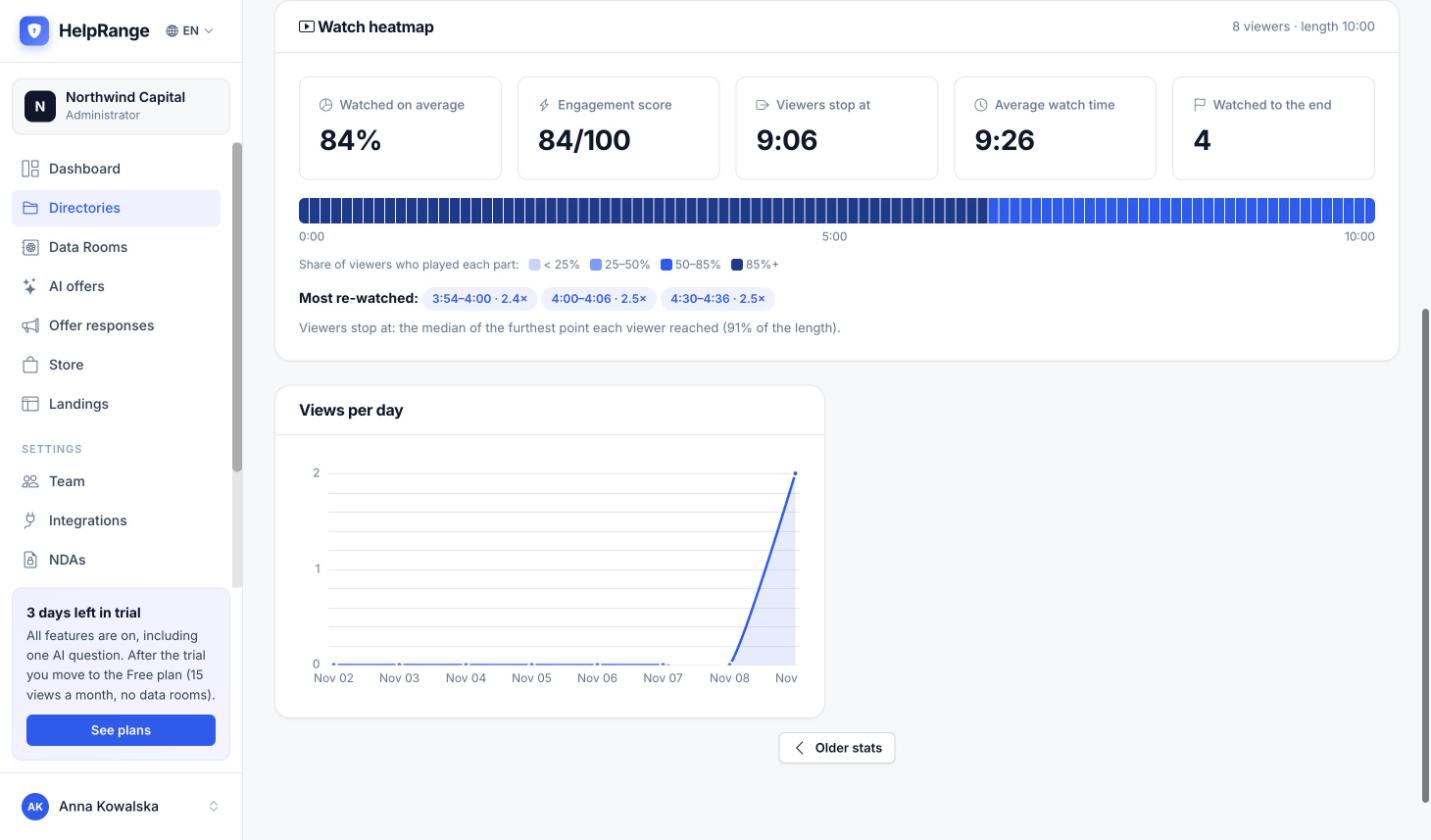
Watch heatmap across all viewers
Average % watched, engagement score, where viewers stop, average watch time and how many watched to the end – above a timeline coloured by the share of viewers who played each part.
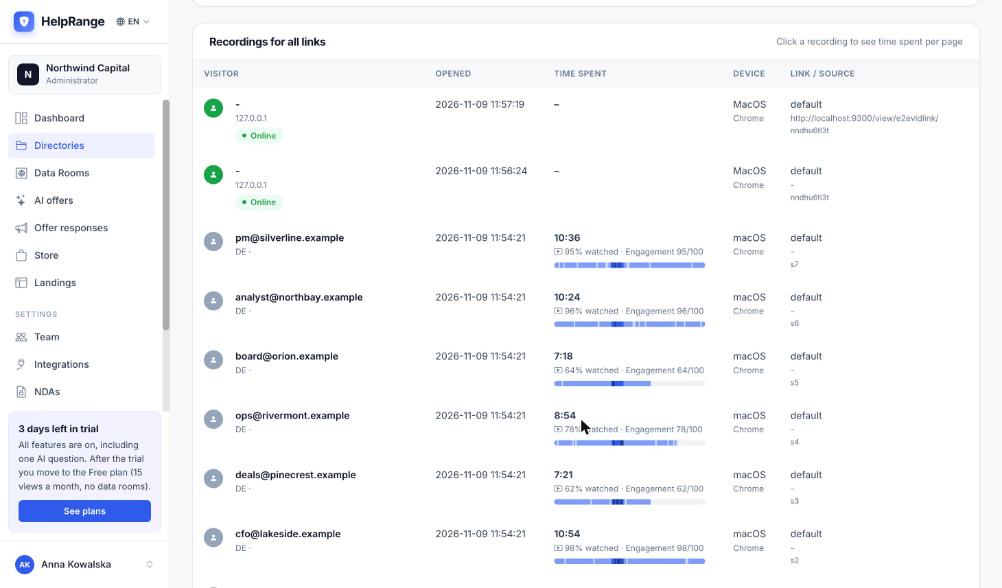
Every viewer in Recordings
Next to each view: watch time, % watched, engagement and a small bar showing which parts were played.
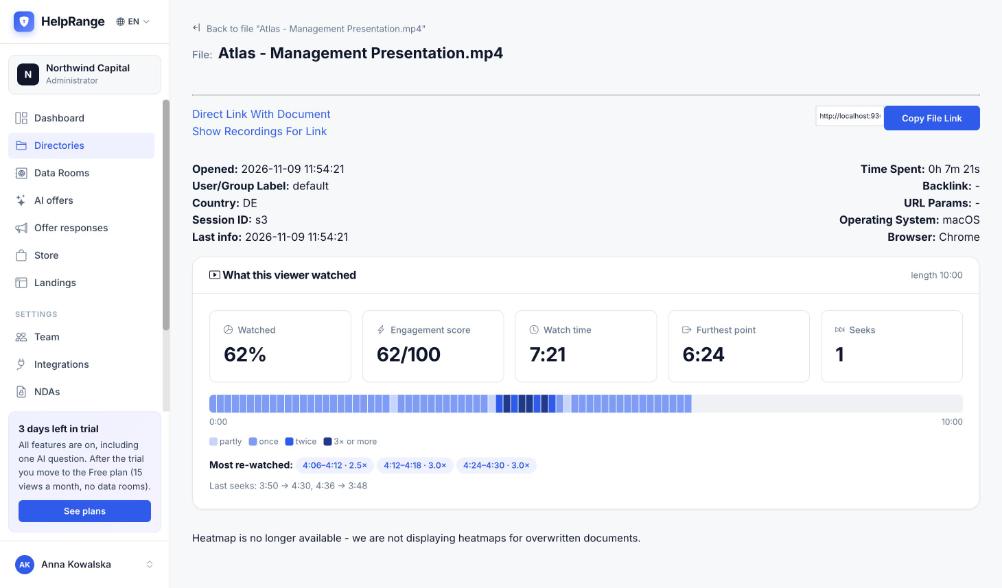
What one viewer watched
Open a view to see the parts played once, twice or more, the furthest point, the watch time and the last jumps.
Where teams use it
Deals and fundraising
Put the management presentation or founder video in the data room and see which investors watched the financials – and who stopped after two minutes.
Publishers and course creators
See which lessons, interviews or audio episodes your members finish and which parts they play again.
Sales
Send a product demo or a recorded pitch and follow up knowing which part the prospect re-watched.
HR and training
Share onboarding or compliance videos and see who watched them to the end.
Upload a video or audio file like any document – to a folder or a data room.
Create a link with the protections you need – e-mail verification, password, expiry, no download – or add the file to a data room.
Open the file’s Statistics for the heatmap, or Recordings for each viewer.
Video and audio analytics is included on every plan, Free included (the Free plan counts 15 views a month). Pro ($39 per team per month) and higher plans have unlimited views; data rooms start on Pro. Plans & pricing
Video and audio analytics – questions
How is “% watched” calculated?
It is the share of the file’s length the viewer played at least once. Playing a part again does not raise it – it shows as a re-watched part instead. The engagement score is the same number out of 100.
What does “Viewers stop at” mean?
The median of the furthest point each viewer reached: half of the viewers stopped before it.
Is every second sent to your server?
No. The player adds up the seconds in the browser and sends one small batch every 15 seconds while playing, and on pause, end, jump or when the page is closed.
Do I see who watched?
Yes, when the link asks for the viewer’s e-mail or the file is in a data room. Otherwise views show the country, device and browser, like document views.
Can viewers download the video?
Only if you allow it. With downloading off, the player has no download button and no right-click menu, and revoked or expired links stop playing.
What happens when I upload a new version?
The heatmap counts the views of the current version only; earlier views keep their own data.
Which plans include it?
Every plan, Free included. The Free plan counts 15 views a month; Pro and higher plans have unlimited views.
Try it on your own documents
3-day free trial, then a free plan. No credit card required.
Start free trial