Document Tracking System: What It Is, Features and Software (2026)
What “document tracking” means, the two kinds of systems, a feature checklist, tools compared with prices – and how finance, legal, medical and sales teams use it.
Updated 8 November 2026. Disclosure: HelpRange is our product. Competitor prices come from each vendor’s own pages, read on 8 November 2026 unless stated.
A document tracking system records what happens to your documents. The phrase is used for two different things: internal routing – where a document is in an approval workflow and who has it now – and tracking documents you send outside – who opened your proposal, contract or pitch deck, which pages they read, for how long, and whether they downloaded or forwarded it. HelpRange is the second kind; if you need the first, you want a document management or workflow system, and we say which below.
What is a document tracking system?
Software that keeps a record of each document’s life after it is created: who has it, who opened it, what they did with it. Where paper offices used a register book, a document tracking system logs events automatically – a view, a page read, a download, a signature, a hand-over to the next approver – and alerts the right person.
An online document tracking system does this in the browser: documents live in the cloud and are opened through links, so every access can be recorded, wherever the reader is.
Two kinds: internal routing vs documents you send
| Internal routing / workflow tracking | Tracking documents you send outside | |
|---|---|---|
| Question it answers | Where is this document, who must act on it next, is it approved? | Did the client, investor or partner open it – and what did they read? |
| Typical documents | Memos, purchase requests, case files, records, incoming letters | Proposals, quotes, contracts, pitch decks, reports, price lists |
| What it records | Status, owner, routing history, versions, deadlines | Opens, readers, time per page, downloads, forwards, location |
| Typical tools | Document management and workflow systems (SharePoint, M-Files, DocuWare), records-management and case-management software | Tracked-link tools (HelpRange, DocSend, Papermark), proposal tools (PandaDoc), CRM documents (HubSpot) |
Many organisations need both: routing inside, tracking outside. The rest of this guide is about the second kind – the one we build.
How online document tracking works
- You upload a document (PDF, Word, PowerPoint, Excel) to the tracking service.
- You share a link – one per recipient, or one link that asks for the reader’s e-mail.
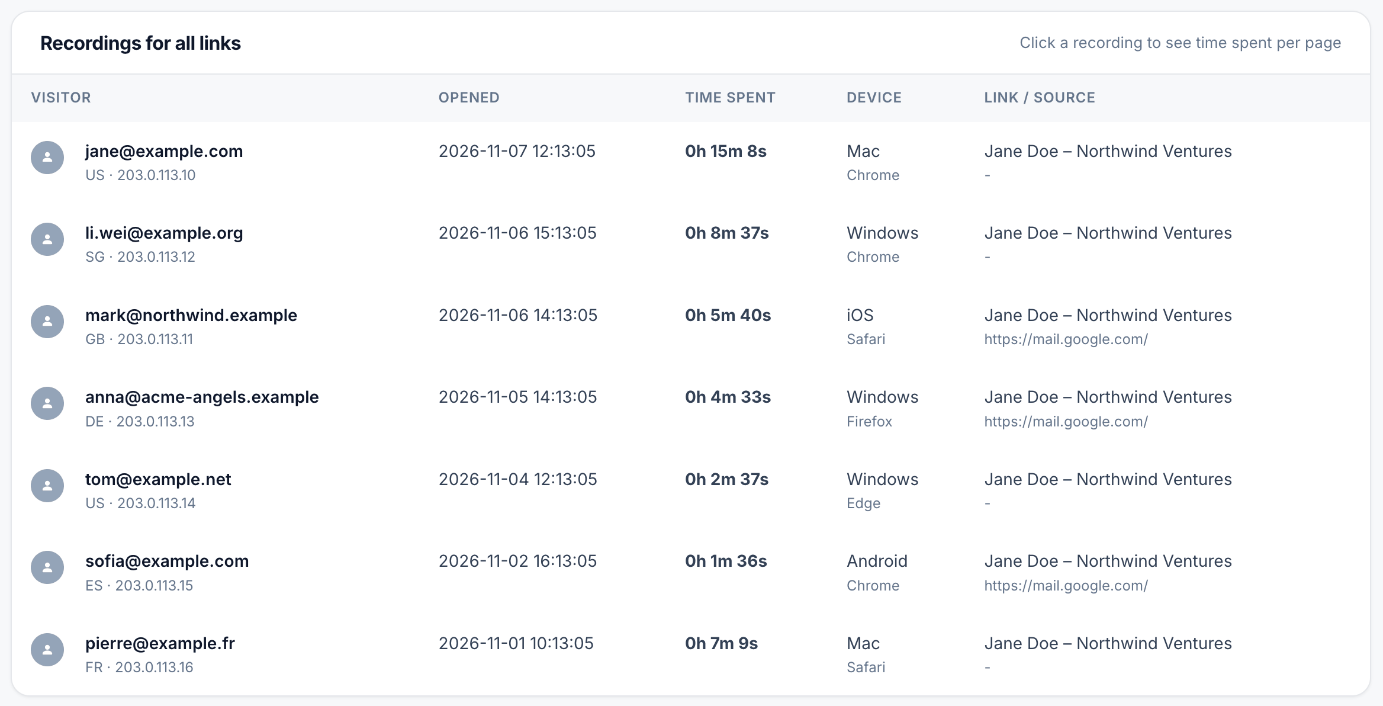
- The reader opens it in a web viewer. The viewer records the visit: who, when, device and country, time on every page, downloads.
- You get an alert and see the analytics; you can change or revoke access at any time.
Why a link and not an attachment? A file on someone else’s computer cannot be tracked reliably – PDF readers block the scripts that would report back. The details, with every method compared, are in PDF tracking: how to track a PDF (opens, pages, time, downloads).
Document tracking system: feature checklist
Tracking
- Real-time alert when a document is opened (e-mail, Slack, webhook to your CRM)
- Reader identity: one link per recipient, e-mail gate, e-mail verified with a one-time code
- Time spent on every page, not only “opened”
- Repeat visits and new viewers (a sign the document was forwarded)
- Download tracking – and the option to switch downloads off
- Device, browser and country of each visit
- Per-recipient engagement summary or score
Control
- Revoke a link, expiry date, views limit
- Watermark with the reader’s e-mail; block printing and copying
- Block forwarding (link usable by one person only)
- Replace the file behind a link without sending a new link
Team and compliance
- Pricing that does not grow with every colleague who needs to see the analytics
- Export of the activity log (CSV) and an audit trail
- Data processing agreement and EU data handling for GDPR
- Integrations: webhooks, Zapier/Make/n8n, API, CRM
Document tracking software compared (with prices)
List prices in USD or EUR per month, read on each vendor’s page on 8 November 2026 (DocSend and Papermark from our sourced pricing posts of late October 2026). Taxes extra; check the vendor before buying.
| Tool | What it tracks | Price | Pricing model | Best for |
|---|---|---|---|---|
| HelpRange | Opens, readers, time per page, heatmap, session replay, downloads, forwards, engagement score 0–100 | Free (15 views a month); Pro $39 ($31 yearly); Unlimited $174 ($139 yearly) – pricing | One price per team, unlimited users | Proposals, pitch decks, reports, data rooms |
| DocSend (Dropbox) | Opens, readers, time per page, downloads | Personal $10 per user (yearly); Advanced Data Rooms $180 yearly for 3 users – DocSend pricing | Per user | Fundraising decks |
| Papermark | Opens, readers, time per page | Free plan; Pro €24 (yearly) – Papermark pricing | Flat EUR plans, paid extra seats | Open-source fans, small teams |
| PandaDoc | Views, time per page, downloads, links clicked (page analytics on Business and up) | Free (5 documents a month); Starter $19, Business $49 per seat (yearly) – pandadoc.com | Per seat | Writing and e-signing proposals in one tool |
| HubSpot Documents | View alerts, visitors, views, average time spent | Part of Sales Hub Starter ($20 per seat, monthly) and Professional ($90 per seat yearly, $100 monthly, plus $1,500 onboarding) – hubspot.com | Per seat | Teams already selling in HubSpot |
| Sellizer | Opens, time per page, heatmap, SMS alert | Solo $22 (1 user, 100 proposals); Team $35 per user – Sellizer compared | Per user, proposal limits | One salesperson with own branding |
| Mailsuite | E-mail opens; PDFs sent as a link: opens, downloads, time per page | Free and Mailtrack €2.99 (5 tracked PDFs); Mailsuite €5.99 per user (unlimited) – mailsuite.com | Per user | Gmail users sending occasional PDFs |
| Adobe Acrobat | View notifications and number of viewers on shared links | Acrobat Standard or Pro (price by country – adobe.com) | Per user | Review of drafts with people who use Acrobat |
| Google Workspace | Who viewed Docs, Sheets, Slides and when (signed-in, same organisation) | Business Standard $14 per user (annual plan) – Google | Per user | Internal collaboration |
For a team of five sending proposals every month, per-seat tools add up: five seats of PandaDoc Business cost $245 a month (yearly), five of Sellizer Team $175; HelpRange Pro stays $39 for the team. For one person, Sellizer Solo or Mailsuite can be cheaper. More on the sales case: proposal tracking.
How to track a Google Doc
Google Docs, Sheets and Slides have an Activity dashboard (the zig-zag arrow icon at the top right, or Tools → Activity dashboard). It lists who viewed the file and when – but only for files owned by a work or school account, only for signed-in viewers, and each user can turn off their view history. It shows no time spent and no pages (Google: see who viewed a file, Workspace admin help, checked 8 November 2026). A personal Gmail account sees no viewers, and PDFs in Drive have no viewer list.
To track a Google Doc you send to a client: File → Download → PDF, upload the PDF to a tracking tool and send the link. You then see the reader, time on every page and downloads – and you can update the file behind the link when the doc changes. To protect the doc itself, see Google Docs security.
HubSpot document tracking vs HelpRange
HubSpot Documents is available with Sales Hub or Service Hub Starter and higher (and Smart CRM Professional and up); the free CRM does not include it (HubSpot knowledge base). When you share a document, you get a notification when a contact views it and see visitors, views and average time spent. Readers are identified only when you require an e-mail address to view.
| HubSpot Documents | HelpRange | |
|---|---|---|
| Open alerts and visitors | Yes | Yes – e-mail, Slack, webhooks |
| Time spent | Average time per document | Time on every page, heatmap, replay of each visit |
| Protection | E-mail required to view | Verified e-mail, passcode, expiry, views limit, no download, watermark, block forwarding |
| CRM | Native – contact timeline in HubSpot | Not native; webhooks, Make or n8n |
| Price for 5 users | 5 Sales Hub seats (from $20 each, monthly) | $39 a month for the team (Pro) |
If your team already pays for Sales Hub seats and needs only “was it viewed”, HubSpot Documents is enough. If you need page-level reading data, protection, or people outside sales to see the analytics, HelpRange covers that at one team price.
Document tracking in 4 industries
Document tracking in the financial industry
Banks, lenders and advisers send loan offers, account agreements and investment reports. Tracking shows which client has opened the offer, which has not, and who keeps returning to the terms page – so an adviser calls the right client at the right time. For confidential reports, downloads stay off and every page carries the reader’s e-mail as a watermark.
Document tracking in the legal industry
Law firms share engagement letters, drafts and case files with clients and opposing counsel. Inside the firm, case-management and document management systems handle routing and versions. For documents that leave the firm, a tracked link records who opened the draft and when, an expiry date ends access when the matter closes, and a log can be exported for the file. See legal document protection.
Document tracking in the medical industry
Hospitals and clinics track patient records internally through their records systems – that is routing, under health-data rules. Tracking documents sent outside applies to things like clinical-trial documents, partner agreements or training material: who read them and whether access should end. Keep patient records in systems built for them.
Document tracking in marketing and sales
The most common use: proposals, quotes, pitch decks and price lists. Knowing the client opened the proposal twice and spent four minutes on pricing tells you when to call; new viewers from the same company tell you it reached the decision maker. See when to follow up on a proposal and tracking engagement with sales materials.
FAQ
What is a document tracking system?
Software that records what happens to documents. The term has two meanings: internal routing systems that show where a document is in an approval workflow and who holds it, and tracking of documents you send outside – who opened them, which pages they read, for how long, whether they downloaded or forwarded them.
What is an online document tracking system?
A web service where you upload a document and share it as a link instead of an attachment. Every open is recorded – reader, time, pages, downloads – and you can protect the document with an e-mail check, expiry, watermark or by blocking downloads. Examples: HelpRange, DocSend, Papermark, PandaDoc and HubSpot Documents.
What is the difference between document tracking and document management?
A document management system stores, versions and routes documents inside an organisation (SharePoint, M-Files, Google Drive). Document tracking for shared documents follows a document after it leaves you: who read it, what they read and whether it was passed on. Many teams use both.
What is the best document tracking software?
It depends on the job. For sales proposals and pitch decks: a tracked-link tool such as HelpRange, DocSend or Papermark. If you write and sign proposals in one tool: PandaDoc. If your team lives in HubSpot: HubSpot Documents. For internal approvals and records: a document management or workflow system.
Is there free document tracking software?
Yes, with limits. HelpRange Free gives tracked links with page-by-page analytics for up to 15 document views a month, PandaDoc Free 5 documents a month, and Mailsuite tracks 5 PDFs on its free plan. Papermark has a free plan too. Or try the free send a PDF and see when it is read tool.
How do I track a Google Doc?
With a work or school Google account, open the Activity dashboard in Docs, Sheets or Slides to see who viewed the file and when; it covers signed-in viewers in your organisation only and shows no time per page. To see what an outside reader read, download the doc as a PDF and share it as a tracked link.
Does HubSpot have document tracking?
Yes. HubSpot Documents, included with Sales Hub or Service Hub Starter and higher, notifies you when a contact views a shared document and shows visitors, views and average time spent. Viewers are identified when you require an e-mail address to view.