How to Send a Secure PDF by Email: Password, Gmail, Outlook (2026)
Encrypt the PDF, send it from Gmail or Outlook, get the password to the recipient safely – and when a secure link is the better choice.
Facts about Gmail, Outlook, Acrobat and Preview checked against their official help pages on 7 November 2026; the Gmail steps and limits checked again in November 2026 (sources at the end); the encryption and permission test on our own tool run on 19 November 2026. Disclosure: HelpRange is our product.
Free tool: Password-protect a PDF
Encrypt a PDF with AES-256 and a password of your choice. Optionally block copying and printing. No sign-up – files are deleted within 30 minutes.
To send a PDF securely, encrypt the PDF itself with a password (AES-256) before you attach it, and send the password by SMS or phone – never in the same e-mail. Gmail and Outlook only encrypt the connection or the message; once the e-mail arrives, an ordinary PDF opens for anyone it is forwarded to. A password protects the file but not who holds it: the password can be forwarded with the file and you cannot take it back. If you need to revoke access, block downloads or see who read the PDF, send a secure link instead of an attachment.
4 ways to send a PDF securely, compared
| Method | What it protects | What it does not protect | Cost |
|---|---|---|---|
| Password-protected PDF (AES-256 attachment) | The file is unreadable without the password – in transit, in a hacked mailbox, on a lost laptop. | The password can be forwarded with the file. Once opened, the recipient can save or print an unprotected copy. No way to revoke it or see whether it was read. | Free (Preview, Word, online tools); Acrobat is paid |
| E-mail encryption – Gmail confidential mode / S/MIME, Outlook Encrypt | The message in transit and access to it: Gmail confidential mode adds expiry, revoking, an SMS passcode and no forward/download; Outlook Do Not Forward keeps the message inside Microsoft 365. | Gmail warns recipients can still take screenshots or photos; S/MIME needs work or school accounts. Outlook: PDF attachments can be downloaded without encryption. The PDF itself has no password. | Gmail: included. Outlook: a qualifying Microsoft 365 subscription |
| Cloud link – Google Drive, Dropbox, OneDrive | Access limited to named accounts (if you choose that); you can stop sharing later; no attachment-size limit. | “Anyone with the link” means anyone the e-mail is forwarded to. Viewers who can download keep a copy. Link passwords and expiry need paid or work plans. | Free tiers; passwords/expiry on paid plans |
| Secure tracked link – HelpRange | Reader verifies their e-mail or enters a passcode; download and print off; their e-mail watermarked on every page; expiry date; revoke at any time; a link can be locked to the first device that opens it; you see who opened it and time per page. | Nobody can stop a phone photo of the screen – the watermark shows whose copy leaked. The reader needs to be online. Not a file they keep. | Free with analytics; protection on Pro, $39 per team per month |
Rule of thumb: the recipient must keep the file (a tax return, a signed contract) → password-protected PDF. You may need to take it back or know it was read (proposal, financials, board pack, pricing) → secure link. Comparing every option for any document type: the most secure way to send documents.
Step 1: password-protect the PDF
Do it now: encrypt the PDF in your browser (free)
- Click the button – the free tool opens at the upload box.
- Select file and type a password (at least 6 characters).
- Protect & download – you get an AES-256 encrypted copy to attach in Step 2.
No sign-up. Printing allowed and copying blocked by default (change it under More options). Files are deleted within 30 minutes. Prefer an app? Steps for Preview, Acrobat and Word below.
Mac: Preview (free, built in)
- Open the PDF in Preview and choose File → Export. Give it a new name to keep the original unprotected.
- Click Permissions.
- Tick Require Password To Open Document, enter the password and retype it.
- Optionally untick printing or changes, and set an Owner Password (it controls those permissions).
- Click Apply, then Save.
Source: Apple – Password-protect a PDF in Preview on Mac.
Adobe Acrobat (paid)
- Open the PDF and go to All tools → Protect a PDF.
- Select Protect with password.
- Choose that the password is needed for Viewing (to open the file), type it twice.
- Click Apply and save.
Adobe warns that a forgotten password cannot be recovered from the file, so keep an unprotected copy. Source: Adobe – Add passwords to PDFs in Acrobat.
Windows / Word (free)
In Word: File → Save a Copy → PDF → More Options → Options → tick Encrypt the document with a password.
Online (free)
Our password-protect PDF tool (the button above) – AES-256, optional block on copying and printing, files deleted within 30 minutes.
Use 12+ characters and a password you do not use anywhere else. More detail for every app: how to password-protect a PDF.
Step 2a: send a password-protected PDF from Gmail
- Open Gmail on a computer and click Compose; add the recipient and subject.
- Click the paperclip (Attach files) and choose the encrypted copy – check the file name, it is easy to attach the original by mistake. Personal Gmail accounts can attach up to 25 MB; bigger files are replaced with a Google Drive link.
- Optional: click the Toggle confidential mode icon at the bottom of the compose window, set an expiration date and choose SMS passcode or No SMS passcode, then click Save.
- In the message, say that the PDF is password-protected and how the password will reach them. Do not write the password.
- Send.
Gmail steps, the 25 MB limit and confidential-mode options checked in Google’s help in November 2026 (confidential mode, attachment size).
Step 2b: send an encrypted PDF from Outlook
- Attach the password-protected PDF to a new message.
- In new Outlook, Outlook.com or classic Outlook, choose Options → Encrypt.
- Pick Encrypt (the message stays encrypted) or Do Not Forward (it also cannot be forwarded or copied).
- Send. Recipients on Outlook.com or Microsoft 365 read it normally; others get instructions to open it.
Two limits from Microsoft’s help pages: you need a qualifying Microsoft 365 subscription, and PDF and image attachments can be downloaded without encryption – only Word, Excel and PowerPoint files stay encrypted after download under Do Not Forward. That is why you still password-protect the PDF. Organisations with certificates can also use S/MIME (Options → More Options → Encrypt this message (S/MIME)). Sources: Microsoft – Encrypt email messages, Microsoft – Send encrypted messages with Microsoft 365 Personal or Family.
Step 3: send the password
- Different channel: SMS, phone call, a messenger, or a password agreed in advance.
- Never in the same or the next e-mail – anyone who gets the mailbox or the forwarded thread gets both.
- Several recipients? One shared password means you can’t tell who leaked the file. Give each person their own watermarked copy and password – a different PDF password for each recipient.
What a PDF password really protects – measured on our own tool
Vendors say "AES-256" and "no printing, no copying". We checked what those words mean in the file itself. On 19 November 2026 we ran the function behind our password-protect PDF tool on a one-page, 75 KB product sheet from our demo data room and inspected the result with two open-source PDF libraries – PyPDF2 3.0.1 and pypdfium2 5.15.2 (the latter wraps PDFium, the engine inside Chrome). The script and its output are reproduced in the table; anyone with Python can repeat it.
| What we checked | What we found | What it means for you |
|---|---|---|
| Encryption written into the file | Standard security handler, /V 5 /R 6, key length 256, crypt filter
AESV3 |
This is the PDF 2.0 AES-256 scheme – the level Acrobat applies when you pick "Acrobat X And Later" as compatibility (Adobe help, checked November 2026); its older compatibility settings use 128-bit keys. Pick the AES-256 option when an app lets you choose. |
| Opening without the password | Both libraries refuse to read any page (FileNotDecryptedError,
PdfiumError); a wrong password is rejected, the right one opens the
text |
Someone who intercepts the attachment or finds it in a forwarded thread gets nothing without the password. The strength of the file is the strength of the password – 12+ characters, not the company name. |
| Longest password accepted | 127 bytes (UTF-8) opened the file | A passphrase of several words works; you are not limited to 8 characters. |
| "No printing, no copying" flags | Permission value /P -3392 with both blocked, -1324 with
both allowed – a difference of 2,068 = print (bit 3) + copy (bit 5) + high-quality
print (bit 12), exactly the three bits of the PDF standard |
The restrictions are flags that the viewer is asked to honour. Acrobat, Preview and Chrome do honour them. |
| Can a recipient who has the password remove those flags? | Yes. Knowing only the open password, a four-line PyPDF2 script read the pages and wrote a new, unencrypted, unrestricted copy; it took well under a second on a laptop | Printing and copying blocks stop a casual reader, not a determined one. The password controls who can open the file; it cannot control what they do once it is open – forward, print, save a clean copy. |
Method, in full: tools.protect(pdf, password, allow_print=False, allow_copy=False)
(the same function the tool calls, which writes the file with pyHanko), then
PdfReader(out).trailer['/Encrypt'] for the dictionary, decrypt()
with a wrong and the right password, PdfWriter().add_page() for every page
and write() for the unrestricted copy. One file, one machine, one day – a
description of what the format does, not a benchmark.
What this changes in the advice above: nothing about Step 1 – encrypt the file, it holds. It does change what you should expect from the permission boxes: tick them, but do not promise anyone that the PDF "cannot be printed". If that promise matters (a price list, a board pack, a financial model), send a link that stays view-only on your server: the document is rendered page by page in the browser, the file is never in the reader's hands, so there is nothing to strip.
What Gmail encrypts on its own
According to Google’s help page, all Gmail messages use TLS automatically – but the message is protected only if the recipient’s provider also supports TLS. Stronger S/MIME encryption is limited to work or school accounts. Gmail shows the level with an icon:
| Icon | Meaning |
|---|---|
| Gray lock | Standard encryption (TLS) in transit |
| Green lock | Enhanced encryption (hosted S/MIME, work or school accounts) |
| Blue shield | Additional (client-side) encryption |
| Red open lock | The message is not encrypted |
None of these put a password on the attachment. Once the e-mail is delivered – or forwarded – the PDF opens for anyone who has it. That is why you encrypt the file itself.
Gmail confidential mode – does it help?
Confidential mode lets you set an expiration date, revoke access (Sent → open the e-mail → Remove access), require an SMS passcode and disable forwarding, copying, printing and downloading of the message and its attachments. Google itself warns that recipients can still take screenshots or photos, and recipients with malicious programs may still copy or download the message. It controls access to the e-mail; it does not encrypt the PDF with a password. Useful on top of an encrypted PDF, not instead of it.
Encrypt other Gmail attachments (Word, Excel, ZIP)
Gmail has no “encrypt attachment” button, so the same rule applies to every file type: protect the file before you attach it.
- Word, Excel, PowerPoint: File → Info → Protect Document (Workbook / Presentation) → Encrypt with Password.
- Several files at once: put them in a ZIP with AES-256 encryption (for example 7-Zip: Add to archive → Encryption method AES-256). Some company mail servers block encrypted ZIPs.
- Want to know it was opened? Gmail cannot tell you; a tracked PDF link e-mails you when it is read.
Large PDFs and cloud links
For personal Gmail accounts the attachment limit is 25 MB; larger files are automatically replaced with a Google Drive link (Google help). Check who can open that link: in Drive’s Share → General access, “Anyone with the link” means anyone the e-mail is forwarded to; Restricted means only people you added (Google Drive help). Dropbox link passwords, expiry dates and disabled downloads are on paid plans (Dropbox help); OneDrive link passwords and expiry need a Microsoft 365 subscription (Microsoft help). Or compress the PDF first. Choosing between sharing platforms: the best way to share a PDF.
The most secure option: a link you can take back
An encrypted attachment is right when the recipient must keep the file. For proposals, financials, contracts under negotiation or anything you may regret sending, a link gives you control after you click Send:
| Encrypted PDF attachment | Secure link (HelpRange) | |
|---|---|---|
| Recipient needs | The password | A passcode or a code sent to their e-mail |
| Forwarding | File + password can be forwarded | Access tied to a verified e-mail; a link can be locked to the first device |
| Download / print | Allowed once opened | Blocked unless you allow it; reader’s e-mail as watermark |
| Take it back | Impossible | Disable the link or set an expiry date |
| Know it was read | No | Opens, time per page, e-mail alert |
How to send one: upload the PDF to HelpRange, switch on e-mail verification, watermark and expiry, copy the link and paste it into your Gmail or Outlook message like any other link. Free accounts get page-by-page analytics; passcodes, expiry, e-mail verification, download blocking and watermarks are on Pro – $39 a month for the whole team. Your whole team, unlimited guests, one price. Or $299 for a single deal. No sales call. (pricing, Deal Room Pass). Free plan: send a PDF and see when it is read, or read how to restrict access to a PDF.
Selling the PDF rather than sending it? Your readers pay for the PDF, not for a file to forward. A secure link above gives them access without a file.
Send it as a protected link instead
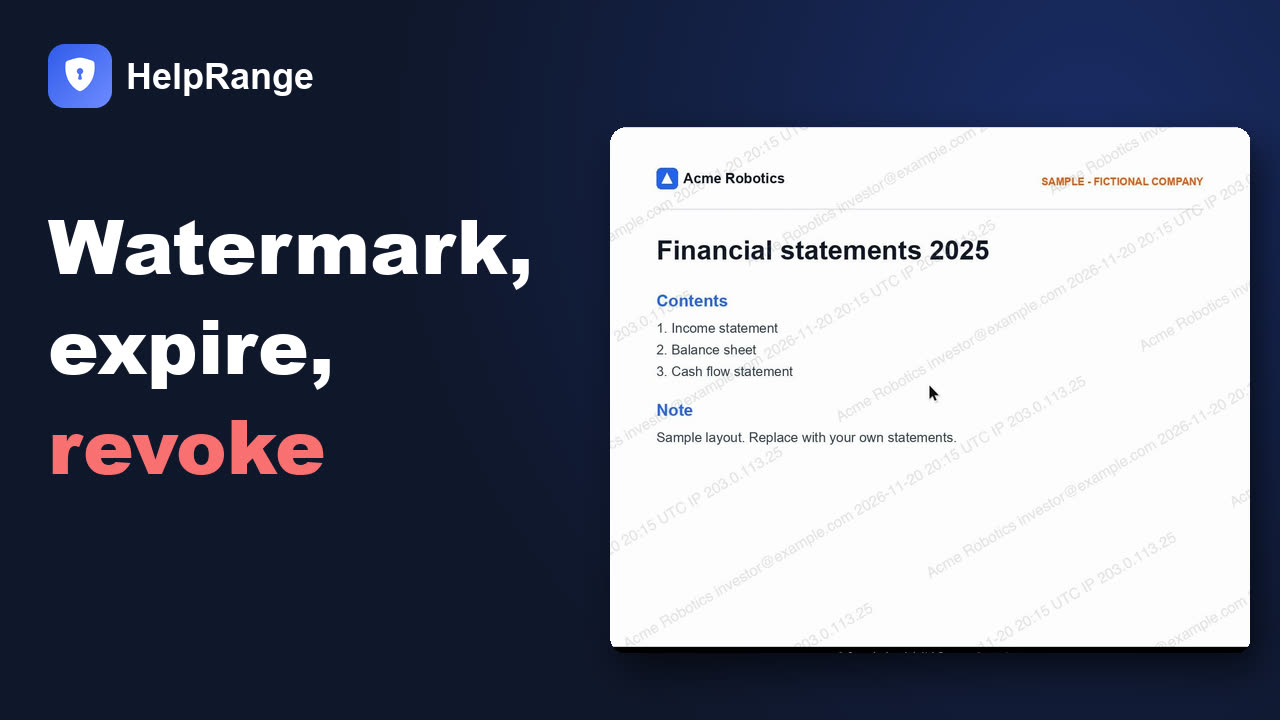
Upload the document and send a link, not the file: readers confirm their e-mail before it opens, download and printing are blocked, every page carries a watermark with the reader's e-mail, the link can expire or be revoked at any time, and you see who read which page.
Protection is part of Pro ($39 per team a month, free trial first); the Free plan keeps tracked links without protection.
FAQ
What is the most secure way to send a PDF?
If the recipient must keep the file: encrypt the PDF with AES-256 and a strong password, attach it, and give the password by phone or SMS. If you need to control what happens after sending: share a link that verifies the reader's e-mail, blocks download and printing, watermarks every page with the reader's e-mail and can be revoked. A password protects the file, not who ends up holding it – the password can be forwarded with it.
Can the recipient remove the "no printing" or "no copying" restriction from a password-protected PDF?
Yes, if they have the password that opens the file. We tested it on our own tool on 19 November 2026: the restrictions are permission flags in the file (print, copy and high-quality print bits) that viewers such as Acrobat, Preview and Chrome honour, but a short script with an open-source PDF library wrote an unrestricted copy in under a second using only the open password. The password decides who can open the PDF; it cannot control what a recipient does afterwards. For that, share a view-only link instead of the file.
How do I send a password-protected PDF in Gmail?
Encrypt the PDF first (Mac Preview: File > Export > Permissions > Require Password To Open Document; Adobe Acrobat: All tools > Protect a PDF > Protect with password; or a free online tool), then in Gmail click Compose, attach the encrypted copy and send. Send the password by SMS or phone, never in the same or the next e-mail.
Does Gmail encrypt attachments?
Gmail sends all messages with TLS, which protects them in transit only if the recipient's provider supports TLS too. It does not put a password on the PDF. Enhanced S/MIME encryption is available only for work or school accounts. To protect the file itself, encrypt the PDF with a password before attaching it.
Does Gmail confidential mode password-protect the PDF?
No. Confidential mode controls access to the message – expiry, revoking, an optional SMS passcode and disabled forward, copy, print and download – but Google warns recipients can still take screenshots or photos. The PDF itself is not encrypted with a password.
Can I send an encrypted PDF from Outlook?
Yes, with a qualifying Microsoft 365 subscription: in a new message choose Options > Encrypt and pick Encrypt or Do Not Forward. Microsoft notes that PDF and image attachments can be downloaded without encryption – only Word, Excel and PowerPoint files stay encrypted after download under Do Not Forward. Password-protect the PDF too if it must stay protected after download.
How do I send the password for a PDF?
Through a different channel than the e-mail: a phone call, SMS or a messenger, or a password agreed in advance. Never in the same or the next e-mail.
Can a password-protected PDF be forwarded?
Yes. The encrypted file can be forwarded like any attachment, and whoever also gets the password can open it. Once opened, the recipient can usually save or print an unprotected copy. To stop forwarding, share a link tied to the reader's verified e-mail instead of the file.
What is the password format of a PDF I received in Gmail?
Gmail does not set PDF passwords – the sender does. Banks, insurers and payroll systems usually explain their format (for example part of your name plus your date of birth) in the e-mail or on their website. Check the message text or contact the sender.
Sources (checked 7 November 2026)
- Google – Gmail encryption (TLS, S/MIME)
- Google – Send messages & attachments confidentially
- Google – Attachment size limit
- Microsoft – Encrypt email messages in Outlook
- Microsoft – Encrypted messages with Microsoft 365 Personal or Family
- Adobe – Add passwords to PDFs in Acrobat
- Apple – Password-protect a PDF in Preview
- Adobe – Securing PDFs with passwords (compatibility levels and 256-bit AES) – checked November 2026
- Our own measurement of 19 November 2026: plus.tools.protect() output inspected with PyPDF2 3.0.1 and pypdfium2 5.15.2 (see the measured section)