Verify a PDF signature
See every digital signature in a PDF – who signed it, when, whether it is intact and whether the document was changed after signing. Unsigned PDFs get hints of later editing.
How it works
Drop the signed PDF
Up to 10 MB and 200 pages. The check starts by itself; the file is read in memory and not stored.
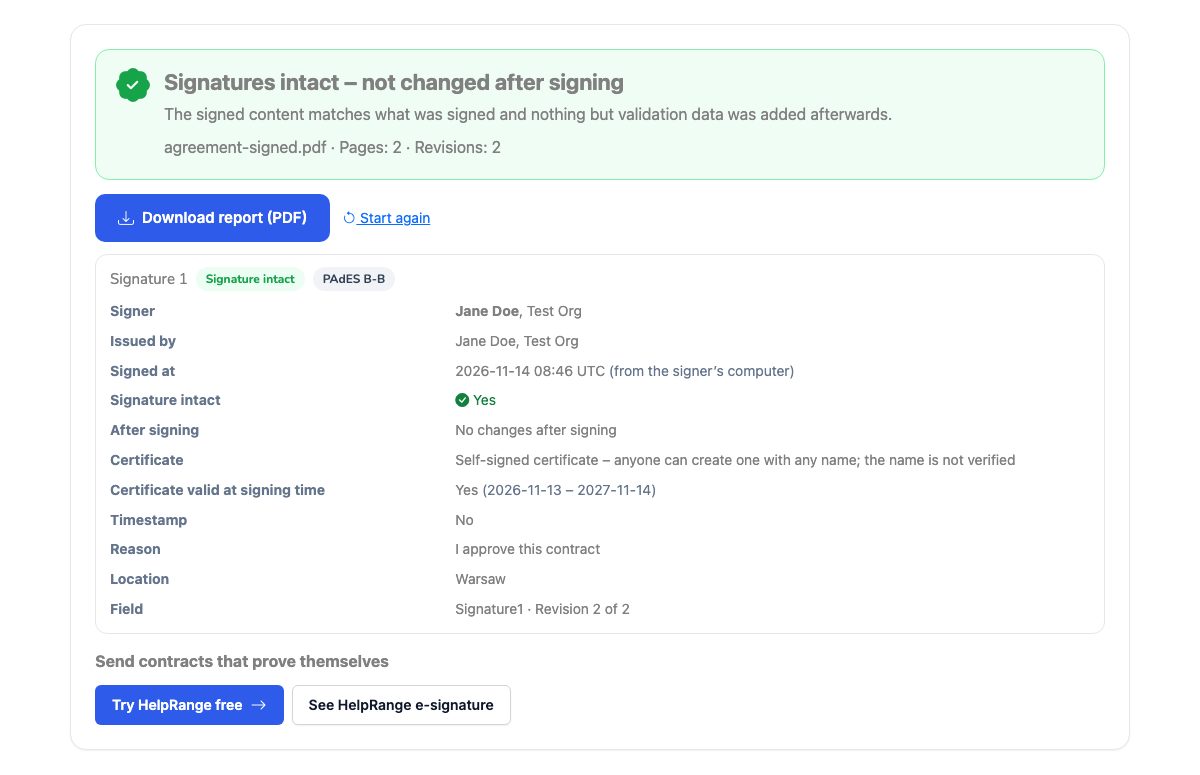
Read the verdict
Green: every signature is intact and nothing was changed after signing. Red: the signed content was altered or modified afterwards.
Look at each signature
Who signed, the certificate issuer, the signing time, a timestamp, the PAdES level and what happened after signing.
Download the report
A PDF with the result to keep with the contract or send to the other side.
Send contracts that prove themselves
HelpRange e-signature seals the completed PDF with a PAdES digital signature – any later change breaks it – and adds an audit trail and a certificate of completion: who signed, when and from where, after confirming a one-time code from their e-mail.
A signed PDF can be opened, edited and saved again – the signature then no longer covers what you see. Before you rely on a signed contract, certificate or invoice, check that the signatures are intact and that nothing was changed after the last one.
What a digital signature proves – and what it does not
A digital signature in a PDF is a fingerprint of the file’s content, encrypted with the signer’s private key. If anyone changes a single byte of what was signed, the fingerprint no longer matches and the signature is broken. PDFs can be changed after signing without breaking the signature, because editors append the changes at the end of the file – that is why this check also looks at everything added after each signature and tells you whether it was only validation data, form filling and comments, or real content changes.
The signature proves that the content is unchanged. Whether the person named in the certificate really signed depends on who issued the certificate. Acrobat checks that against the Adobe Approved Trust List and the EU trusted lists; this free tool does not, and says so instead of calling the signature “valid”. A self-signed certificate can carry any name.
Unsigned PDFs: hints of editing
- Later saves – the file was saved again after it was created; an earlier revision with different text is a strong sign that someone edited the wording.
- Dates and programs – a modification date long after the creation date, or a PDF editor as the last program, means the file was opened and saved again.
- Cover-ups – text under black boxes or white text, also found by the PDF security check.
These are hints, not proof: many have innocent explanations. To see exactly what changed between two versions, use compare two PDFs.
Verify a PDF signature – questions
Is it free?
Yes – no sign-up, PDFs up to 10 MB and 200 pages.
Does "intact" mean the signature is legally valid?
No. Intact means the signed content has not been altered since the signature was made. Whether the signature is legally valid also depends on the certificate: who issued it, whether it chains to a trusted provider and whether it was revoked. This tool does not check certificates against the Adobe or EU trust lists and says so in the result.
What does "modified after signing" mean?
Content was added to the file after the signature – for example text, pages or images changed with a PDF editor. Filling in form fields, adding comments or further signatures can be allowed by the signer and are shown separately.
Can it prove that an unsigned PDF was forged?
No. For unsigned PDFs it shows hints – later saves, an earlier version with different text, editing tools, dates – that are worth a closer look. Many have innocent explanations.
Do you keep my file?
No – it is checked in memory and not stored.
What is PAdES?
PDF Advanced Electronic Signatures – the European standard for signatures inside PDFs. B-B is a basic signature, B-T adds a timestamp from a timestamp authority, B-LT adds the data needed to validate it later, B-LTA adds archive timestamps.
My signature shows as “not checked against a trust list” – is it fake?
Not necessarily. It means this tool did not check who issued the certificate. Open the PDF in Adobe Acrobat Reader to see whether the certificate is trusted, or ask the sender which provider issued it.