Compare two PDFs
Upload the old and the new version of a contract, offer or report and see every added, deleted and changed word – page by page, with a redline you can download as a PDF.
How it works
Drop the old version
A PDF or a Word file (DOC, DOCX, ODT, RTF) – up to 10 MB and 200 pages.
Drop the new version
The comparison starts by itself as soon as both files are in.
Go through the changes
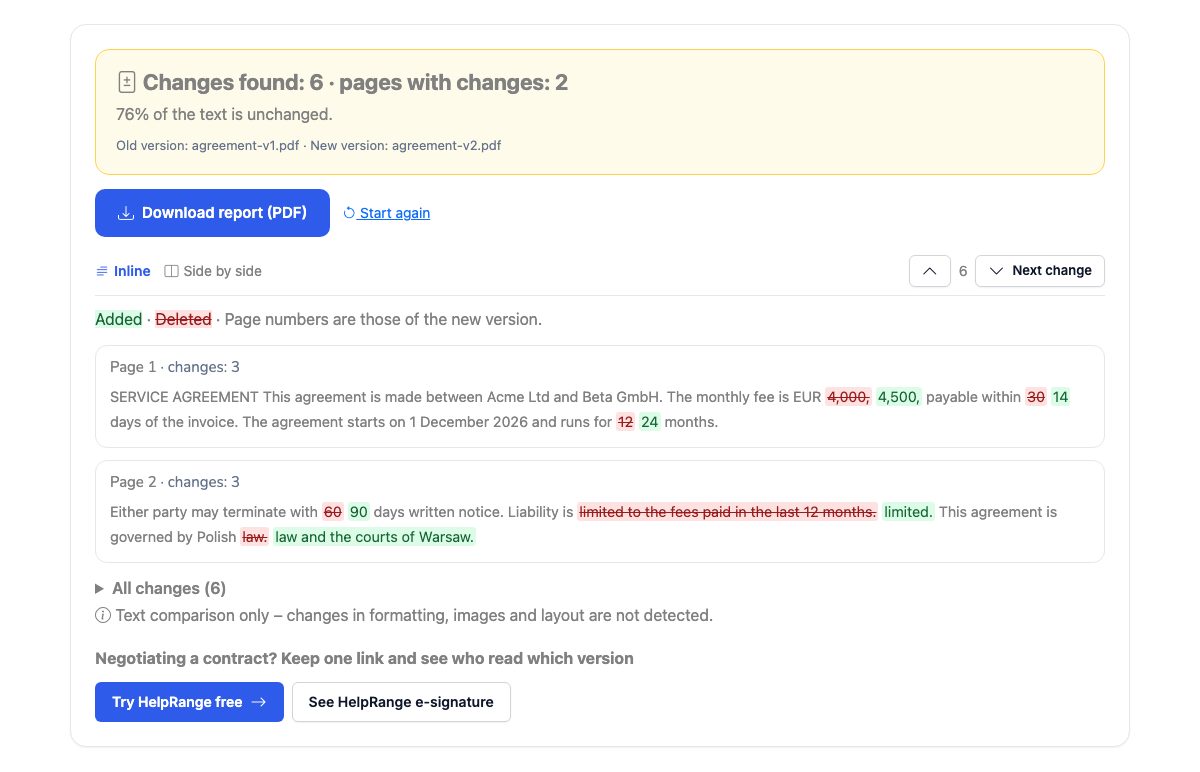
Added words are green, deleted words red and struck through, page by page – inline or side by side, with a button to jump to the next change.
Download the report
A PDF with the summary, the redline of every page with changes and a table of all changes.
Negotiating a contract? Keep one link and see who read which version
Share each new version through the same HelpRange link: readers always get the latest one, and you see who opened it and which pages they read. When the text is final, send it for e-signature – with an audit trail and a sealed PDF.
Paid tools such as Adobe Acrobat Pro or Draftable do the same job for a monthly fee. For the everyday question – what did the other side change in the contract before sending it back? – a text redline is what you need: it shows every changed number, date and clause, even when the lines and pages moved.
When to compare two versions
Whenever a document comes back from the other side: a contract or NDA with “a few small edits”, an offer after a round of negotiation, a policy or terms and conditions before you accept them, a report that was “only reformatted”. Reading both versions side by side by eye misses the changes that matter – a number, a date, “not” added to a sentence. The redline shows every one of them.
The comparison works on the words, not on the lines: if a paragraph moved to the next page or the lines wrap differently, that is not reported as a change. A word split by a hyphen at the end of a line is joined back, and typographic quotes and dashes count as the plain ones.
What it does not see
- Formatting – bold, fonts, colours and layout are not compared, only the text.
- Images and scans – a scanned PDF is a picture of the page and has no text; the tool says so. Run OCR first, or ask for the original file.
- Moved paragraphs are shown as deleted in one place and added in the other.
Before you sign the final version, check it was not changed after the last round: compare it with the version you agreed, and use the PDF signature check on the signed copy.
Compare two PDFs – questions
Is it free?
Yes – no sign-up. Two files up to 10 MB and 200 pages each.
Do you keep my files?
No. Both files are compared in memory and nothing is stored – the report is sent to your browser and not kept.
Does it compare formatting and images?
No – it compares the text, word by word. Changes in fonts, colours, images or layout are not shown. Scanned PDFs (pictures of pages) have no text to compare.
Can I compare Word documents?
Yes – upload DOC, DOCX, ODT or RTF files; they are converted to PDF first. You can also compare a Word draft with the signed PDF.
Why is a whole paragraph marked as changed?
When most words of a passage differ, it is shown as deleted and added in one piece – usually a rewritten clause. Short edits are marked word by word.
Can I compare a PDF with a Word document?
Yes – drop the PDF as one version and the DOCX as the other. The Word file is converted to PDF first, so page numbers follow the converted layout.