Share a PowerPoint online – view-only link with slide analytics
Short answer: Upload the PowerPoint to HelpRange and send a link instead of the file: readers see the slides in the browser with their e-mail on each one, cannot download or print, and you see the time spent on every slide. Animations, transitions and embedded video are flattened in the viewer. Watermarks and download blocking are part of Pro ($39 per team a month).
Upload the .pptx and send a link instead of the attachment. Investors and clients go through the slides in the browser, with their e-mail on every slide and no file to download or forward. You see who opened it, which slides they read and for how long.
Slides in the browser
PowerPoint (.pptx, .ppt) and OpenDocument (.odp) files are converted to slides on upload – the reader needs no PowerPoint and no account.
Time on every slide
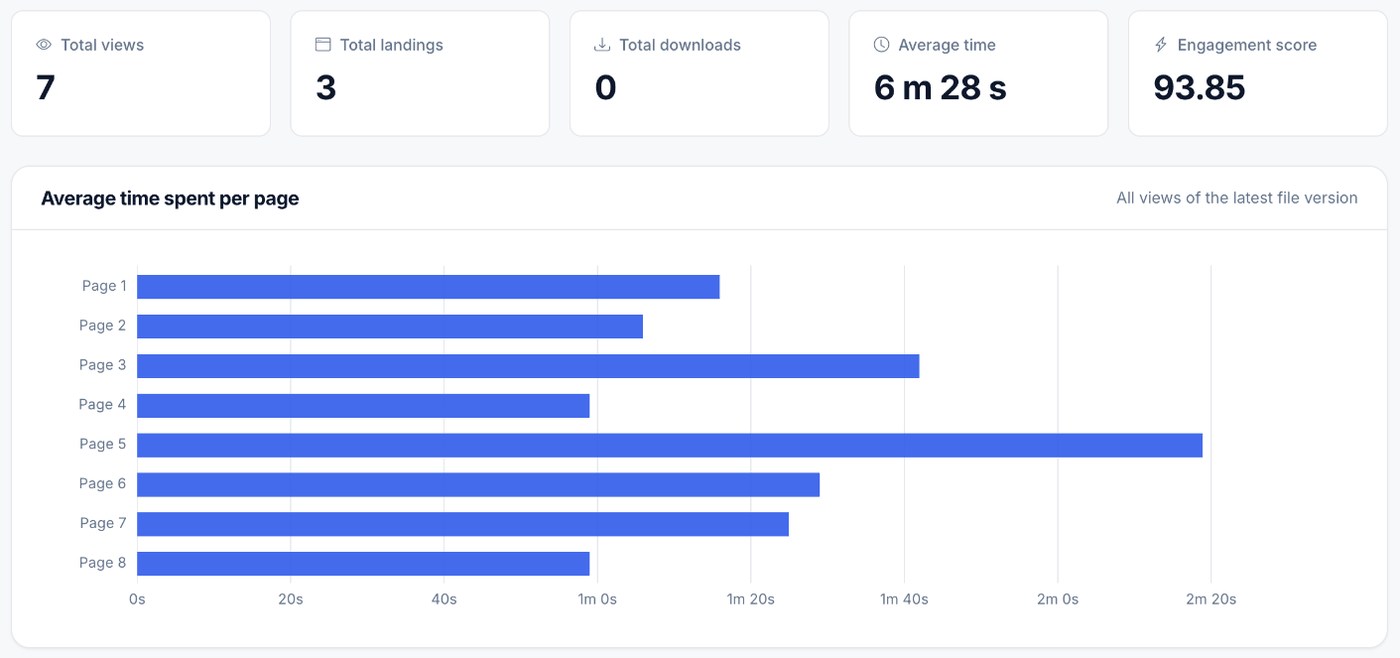
Each slide is a page in the statistics: which slides each reader saw, for how long and where they stopped. Heatmaps and visit replay show how they went through the deck.
The reader’s e-mail on every slide
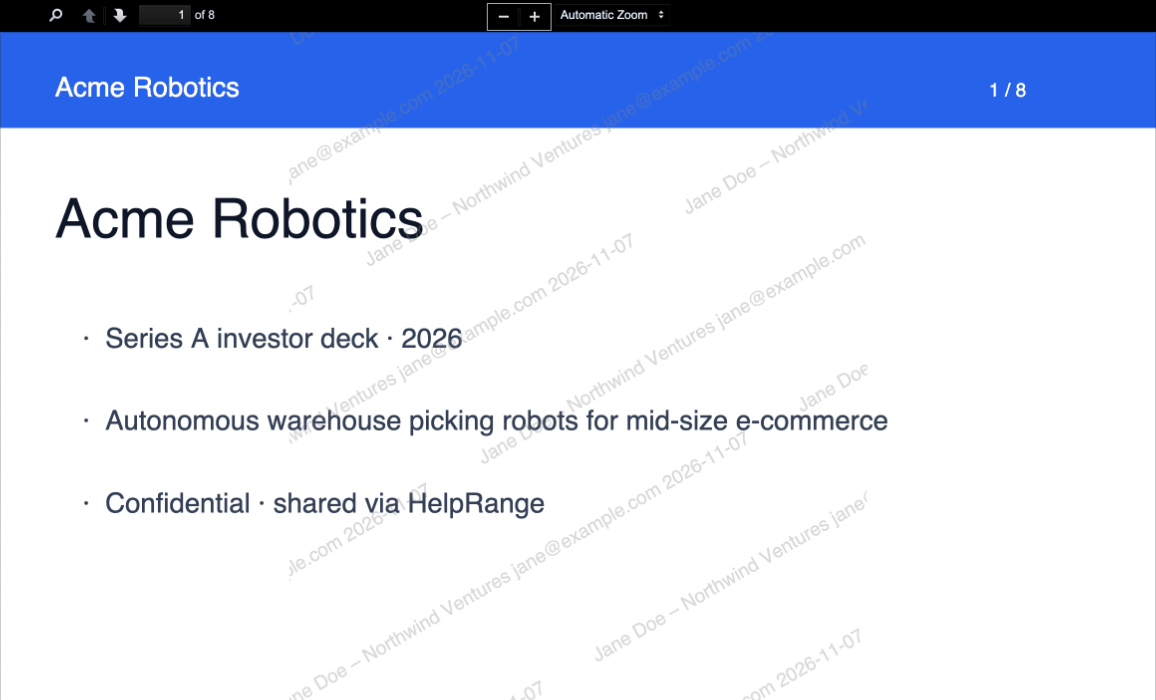
“Enable Watermark” puts the reader’s e-mail (or your link label) and the date across each slide – optionally also the time and IP address.
Image mode
Readers get only pictures of the slides with the watermark burned in – no text to copy and no PDF behind them.
Screenshot protection
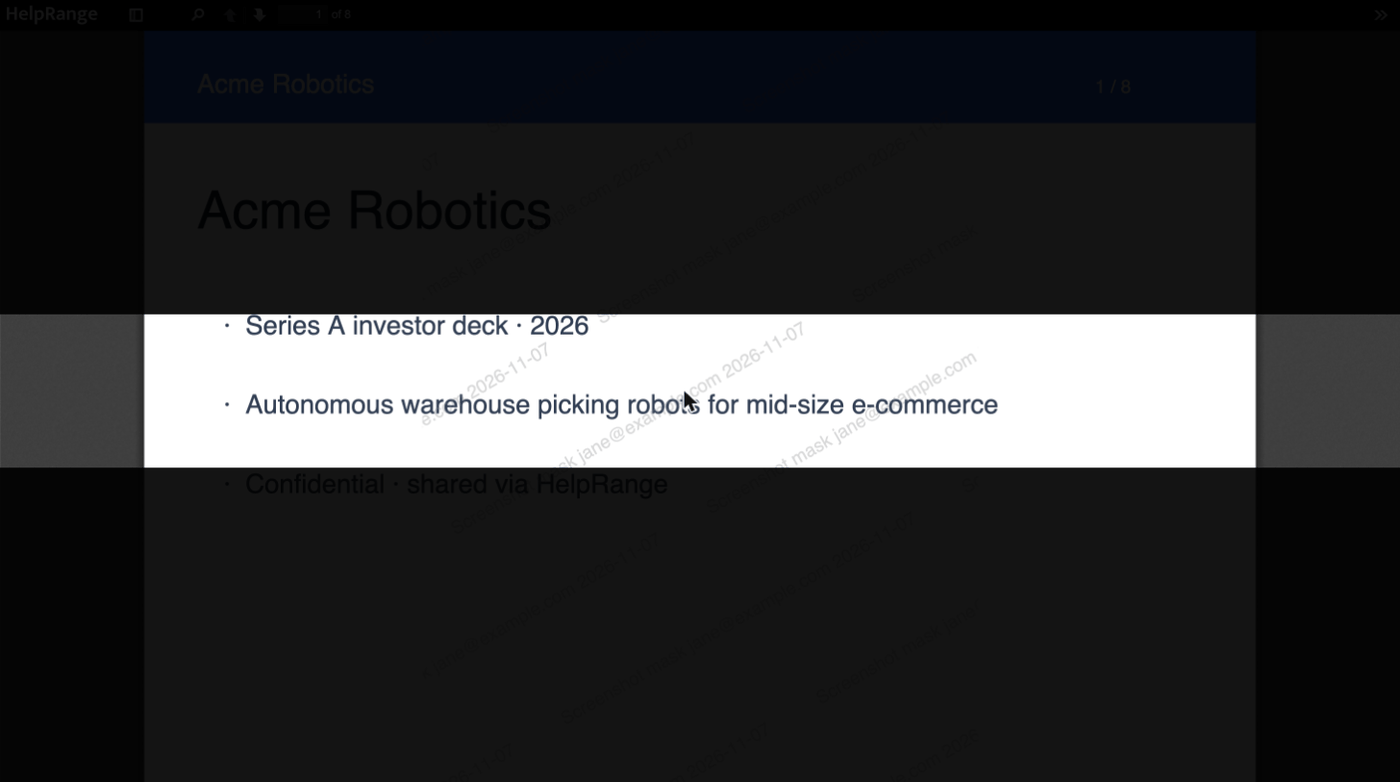
“Screenshot Mask” keeps only a band of the slide readable at a time on a computer; “Screenshot Protection” opens the deck only in the HelpRange app for iPhone, iPad and Android, where a screenshot cuts off access.
Forwarding under control
Ask for the reader’s e-mail or a passcode, set an expiry date or a views limit, or switch on “Disallow forwarding” so that only the first person who opens the link can use it again.
What your reader sees – and what you see
The deck with the reader’s watermark
Every slide carries the reader’s e-mail or the link label and the date, tiled across the page.
Screenshot mask
Only the band around the pointer is readable, so a screenshot of the whole slide shows mostly a dark page.
Time spent on each slide
The average time on every slide across all views of the latest version – and the same for each single visit.
For fundraising and sales
One link per investor
A labelled link for each fund shows who read the deck and which slides – and lets you switch off one investor without touching the others.
Know when it is opened
An e-mail when a reader opens the deck, plus Slack messages or webhook events for your CRM.
Update the deck, keep the link
Upload the new version and everyone with the link sees it – no more “v7 final” attachments.
Then a data room
When due diligence starts, put the deck, the financial model and the contracts in a data room with NDA and per-person permissions.
What changes when a deck is converted
The viewer shows your slides as pages, the way a PDF export would. Check the preview once before you send.
Kept
- Slide layout, text, pictures, shapes, charts and tables
- One page per slide, in the same order
- The final state of every slide, with all its content visible
Not kept
- Animations, builds and slide transitions – they are flattened
- Embedded video and audio do not play – share them as separate files
- Speaker notes are not shown
- Fonts that are not embedded may be replaced by a similar font
- Decks over 100 MB are large files: download only, without conversion or watermark
Already have a PDF export? Upload the PDF instead – same viewer, same analytics, and the layout exactly as you exported it.
Ways to send a deck – and what each one stops
| Method | The reader gets | Can they pass it on? | Their name on each slide | Time per slide | Take access back |
|---|---|---|---|---|---|
| .pptx attached to an e-mail | The editable file | Yes – and edit it | No | No | No |
| PDF export attached to an e-mail | A PDF file | Yes | No | No | No |
| Cloud drive share link | A preview, often with a download option | The link can be forwarded unless it is limited to named accounts | No | No | Yes, by changing the sharing |
| HelpRange secure link | Slides in a protected viewer | The link can ask for their e-mail, a passcode or allow one reader only | Yes | Yes, for every reader | Yes – expiry, views limit or one click |
Drag the .pptx into a folder. It is converted to slides within a couple of minutes and the link is created with the upload – open it once to check the fonts and layout.
In “Edit link” leave “Allow download & print” off, switch on “Enable Watermark”, and add “Passcode protect”, “Landing page (ask for e-mail)”, “Set expiration date” or a “Views limit”. For investors, use “Create link for specific user/group” – one link and label per fund.
“Copy File Link” and send it. The statistics show who opened the deck, the time on every slide and where each reader stopped.
The viewer and slide-by-slide analytics work on every plan, Free included (15 views a month). Watermark, download and print blocking, image mode, passcode, the e-mail form and expiry: Pro, $39 per team per month. Screenshot Mask, Screenshot Protection and NDA before opening: Max, $87 per team per month, and up. Plans & pricing
One price per team – unlimited users and guests
Pro $39, Max $87 or Unlimited $174 a month, or a Deal Room Pass for $199 once for one deal. No per-user fees, no sales call.
PowerPoint & pitch decks – questions
How do I share a PowerPoint without letting people download it?
Upload the .pptx to HelpRange, open “Edit link” and leave “Allow download & print” off. The reader sees the slides in the browser and gets no file. Switch on “Enable Watermark” so that any screenshot shows their e-mail.
What is lost when a PowerPoint is converted?
Animations, builds and transitions are flattened – every slide shows its final state. Embedded video and audio do not play, speaker notes are not shown, and fonts that are not embedded may be replaced by a similar one. If something looks off in the preview, export the deck to PDF from PowerPoint and upload the PDF.
Can I see which slides an investor read?
Yes. Every slide counts as a page: you see the time on each slide for every visit and on average, the last slide reached, heatmaps and a replay of the visit.
Can people take screenshots of my slides?
On a computer nothing can fully stop screenshots. The watermark puts the reader’s e-mail on every slide; “Screenshot Mask” shows only a band of the slide at a time; image mode sends pictures of the slides with the watermark burned in; “Screenshot Protection” opens the deck only in the HelpRange app, where a screenshot cuts off access.
Can readers download the original .pptx?
Only if you switch on “Allow download & print” for the link – then they get the original, editable file. Leave it off to share the deck view-only.
How big can a deck be?
Up to 100 MB with the viewer and every protection. Larger decks – usually because of embedded video – are large files: download only, without conversion or watermark. Compress the media or export to PDF to stay under 100 MB.
Which plans include it?
The viewer and slide analytics work on every plan, Free included (15 views a month). Watermarks, download blocking, image mode, passcodes and expiry dates: Pro ($39 per team per month). Screenshot protection and NDA before opening: Max ($87 per team per month) and up.
Try it on your own documents
3-day free trial, then a free plan. No credit card required.
Start free trial Compare plans – from $39 per teamUpdated