Watermark a PDF for each buyer
Upload your PDF and paste your buyers – or a CSV with e-mail, name and order ID. You get a ZIP with one personalised copy per buyer, stamped on every page.
How it works
Upload the PDF you sell
An e-book, workbook, report or template – up to 10 MB.
Add your buyers
Paste one buyer per line (e-mail, name, order ID) or upload the CSV export from your shop – up to 50 at a time.
Choose what the stamp shows
Name, order ID and date; one line, a tiled pattern or your logo – checked in the live preview.
Download the ZIP
One personalised copy per buyer, named after their e-mail, ready to send.
No file to forward: buyer access instead of copies
A stamped PDF can still be forwarded – the stamp only shows who leaked it. With HelpRange buyers read in a protected viewer with their e-mail on every page, there is no file to pass on, and access is revoked on a refund.
Personalised (social DRM) watermarks are how many publishers protect e-books, courses and paid reports: the buyer's own e-mail on every page makes forwarding personal. They do not make copying impossible – they make the source of a leak obvious.
Why sellers stamp each copy
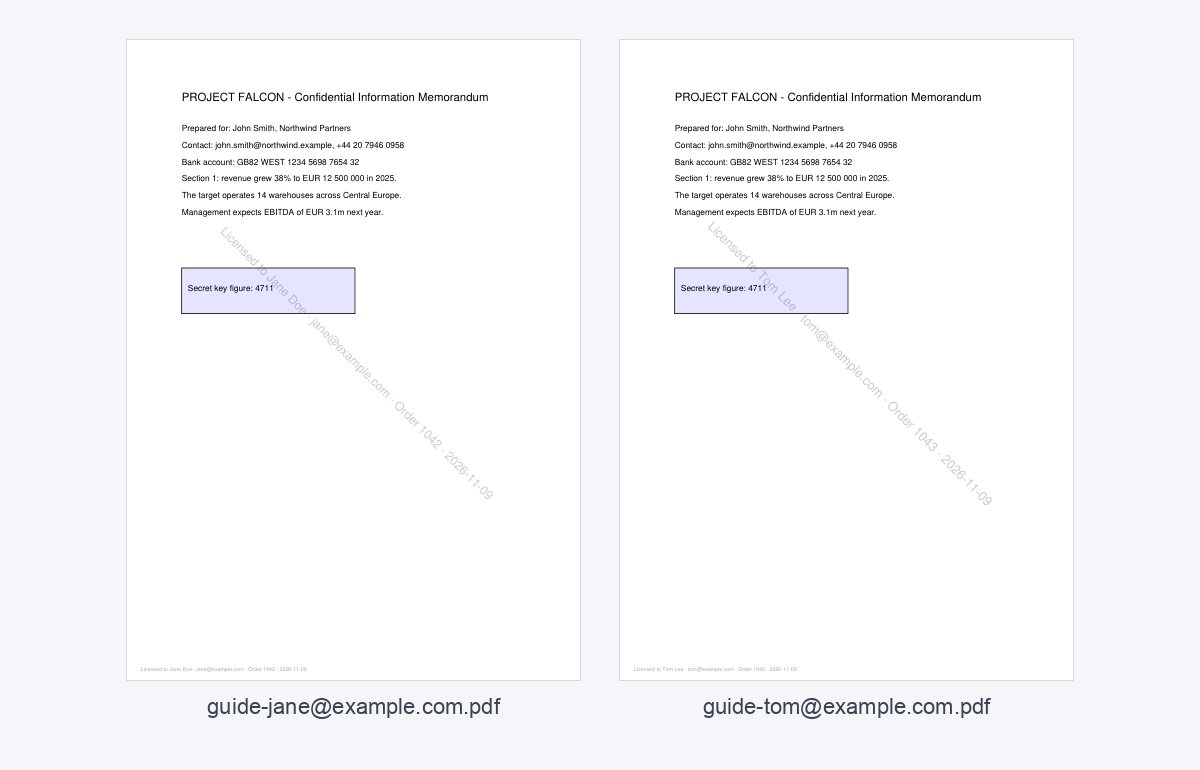
Digital products are copied because copying is free and anonymous. A visible “Licensed to Jane Doe · jane@… · Order 1042” line on every page removes the anonymity: buyers rarely share a file with their own name and order number on it. Each copy also carries an invisible fingerprint that the free leak tracer can read back if a copy shows up on a sharing site.
Typical uses: e-books and guides sold on Gumroad, Etsy or Shopify, course workbooks, paid research reports, templates and sheet music.
Getting the buyer list from your shop
- Shopify, WooCommerce, Etsy, Gumroad: export the orders as CSV and upload the file – the tool finds the e-mail in any column and uses the next columns as name and order ID.
- Process buyers in batches of up to 50, or right after each sale.
- Keep the stamp light: buyers read the whole book with it.
A stamped PDF can still be forwarded – the stamp only shows whose copy it was. If you sell many copies, compare your platform fees with the e-book fee calculator and consider delivering access in a protected viewer instead of a file.
How to watermark a PDF for each buyer
- Choose the PDF you sell (up to 10 MB).
- Paste your buyers, one per line – e.g.
jane@example.com, Jane Doe, 1042– or upload the CSV export of your shop. - Choose what the stamp shows: name, order ID, date.
- Download the ZIP and send every buyer their own copy.
Stamped copies or buyer access?
A stamped copy is still a file: it can be forwarded, and refunds cannot take it back. With HelpRange buyer access buyers read in a protected viewer with their e-mail on every page, there is no file to pass on, and access ends on a refund.
Watermark a PDF for each buyer – questions
Is it free?
Yes – no sign-up, PDFs up to 20 MB, up to 50 buyers at a time.
What does the stamp show?
Always the buyer's e-mail; optionally the name, the order ID and today's date – on every page, diagonally and in the footer. Each copy also carries an invisible fingerprint our leak tracer reads back.
Does a watermark stop buyers sharing the PDF?
No. A stamped file can still be forwarded or uploaded – the stamp identifies whose copy leaked and deters most buyers. To stop sharing, give buyers access instead of a file.
How should the CSV look?
One buyer per row: an e-mail address and optionally a name and an order ID, in any column order, separated by commas or semicolons. A header row is skipped.
Do you keep my file?
Only for a short time: uploads are deleted right after processing, the result after 30 minutes – or at once with “Delete now”.
Can I add my logo to the buyer copies?
Yes – upload a PNG or JPG logo; it is placed in the middle or tiled across the page, with the buyer’s details under it.