Who leaked this PDF?
Upload a forwarded or leaked copy. If it was made with our free per-recipient watermark tool, we read its invisible fingerprint and tell you whose copy it was.
How it works
Upload the leaked copy
The PDF that was forwarded, posted or found online.
We look for the fingerprint
An invisible code that the free per-recipient watermark tool hides in every copy, plus any e-mail addresses visible on the pages.
See whose copy it was
If the fingerprint is there, the result names the recipient the copy was made for.
Know who leaked it – before it happens
In HelpRange every reader sees their own e-mail on every page, and you see exactly who opened what. Revoke access in one click.
Send every recipient their own copy with the free per-recipient watermark tool – the visible e-mail deters forwarding, and the invisible fingerprint identifies the source if the file is passed on anyway.
How the fingerprint works
When you make copies with the per-recipient watermark tool or the per-buyer watermark tool, each copy gets a short code that only this site can decode – hidden in the document properties and as invisible text on every page. The visible e-mail can be cropped or blurred; the hidden code usually survives, because most people do not know it is there.
The tracer also lists every e-mail address visible in the document – a watermark from another tool often gives the source away too.
What it cannot do
- It cannot trace copies that were not made with our watermark tools.
- A printed and re-scanned copy, or a PDF re-created from screenshots, loses the hidden code – the visible watermark is then the only evidence.
- It tells you whose copy leaked, not who posted it – the recipient may have forwarded it to someone else.
For documents that must not leak, prevention beats tracing: share a link where each reader sees their own e-mail on screen, downloads are blocked and access can be revoked.
Example: a deck that appeared on a forum
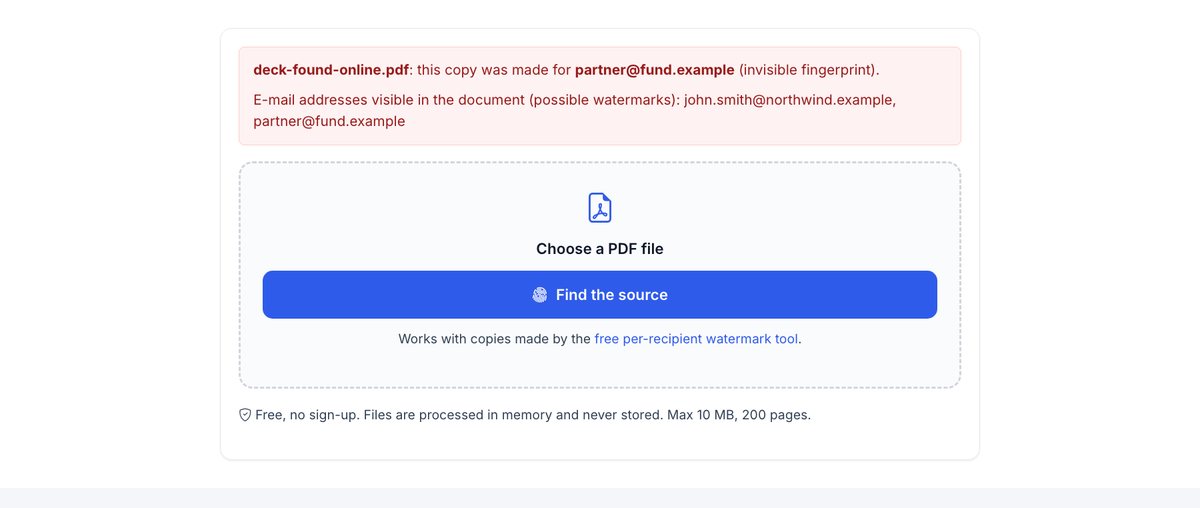
You sent your deck to 12 investors as personalised copies. A month later it shows up on a forum with the visible e-mail cropped out. Upload the copy here: the hidden fingerprint names the fund it was made for, and you know which relationship to talk to.
Who leaked this PDF? – questions
How does the fingerprint work?
Each personalised copy from our watermark tool carries an invisible, encoded recipient code inside the file. Only this tool can read it back.
Does it survive printing or screenshots?
No – the invisible fingerprint lives inside the PDF file. The visible e-mail watermark is what remains on prints and screenshots.
Do you keep my file?
Only for a short time: uploads are deleted right after processing, the result after 30 minutes – or at once with “Delete now”.
Does the tracer store the PDF I upload?
No – the file is read in memory to look for the fingerprint and is not kept.