Resize PDF pages (A4, Letter…)
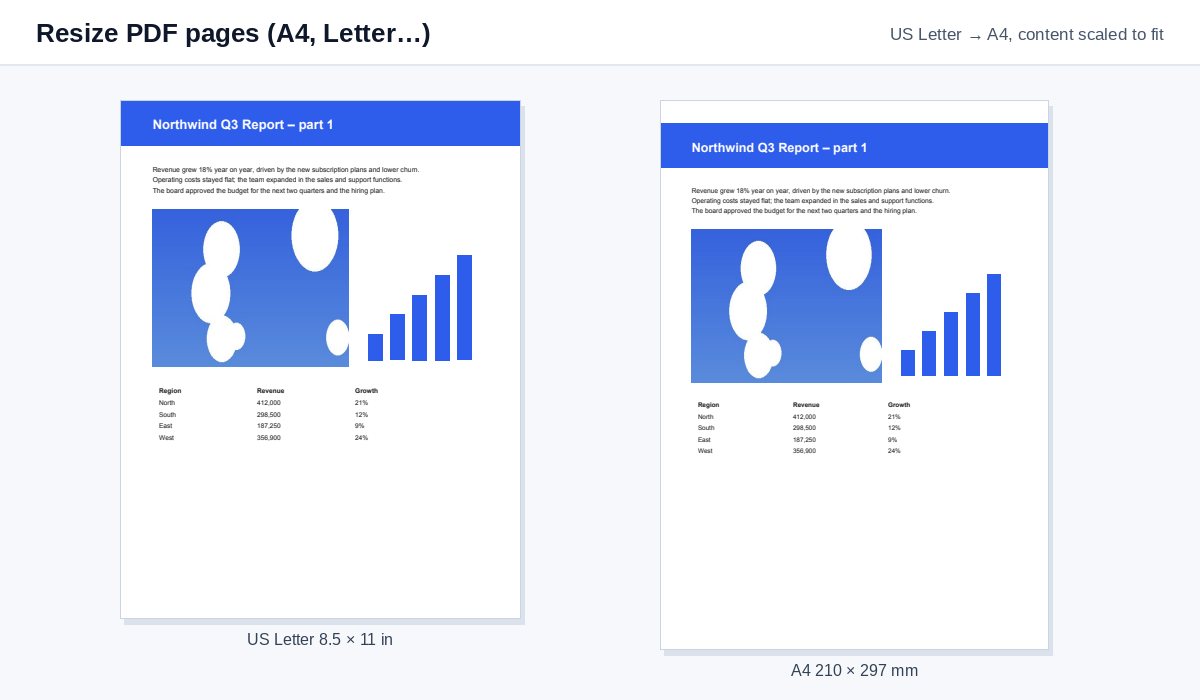
Change every page to A4, US Letter, Legal, A3 or your own size – the content is scaled to fit, so nothing is cut off.
How it works
Drop the PDF
Up to the size limit shown next to the drop zone.
Click the new size
A4, Letter, Legal, A3 or A5 – one click starts the resize; a custom size under More options.
Download
Every page has the new size, the content scaled to fit and centred.
Sending a document pack? Use a data room instead
Put all files in one HelpRange data room: guests log in with an e-mail code, sign your NDA, and you see who opened which document – with uploads and AI answers from the documents.
A US Letter PDF printed on A4 paper gets cut off at the bottom; an A4 document printed in the US gets cut at the sides. Resizing the pages to the paper the reader uses – or to one size for a mixed bundle of scans – fixes printing and makes a merged document look consistent.
A4 or Letter?
A4 (210 × 297 mm) is the standard almost everywhere; US Letter (8.5 × 11 in, 216 × 279 mm) in the USA, Canada and parts of Latin America. Letter is wider and shorter, so a Letter page printed on A4 loses its bottom lines, and an A4 page printed on Letter loses its edges. Resizing scales the content so the whole page prints.
Options
- Scale the content to fit (default) keeps proportions and centres the page; a thin white band appears where the shapes differ.
- Keep the content size only changes the paper – useful to add white space around a page.
- Margins add space on every side, e.g. for binding.
- Mixed bundle of scans? Resize everything to A4, then merge and number the pages.
Example: a US contract for A4 printing
A contract drafted in the US arrives on Letter paper and must be printed and signed in Europe. Drop it and click A4: every page is scaled to fit A4 without cutting off the signature block at the bottom.
Resize PDF pages (A4, Letter…) – questions
Is the content stretched?
No – it is scaled evenly to fit the new page and centred, so proportions stay the same. Choose "Keep the content size" under More options to only change the paper.
What about landscape pages?
They stay landscape: each page gets the new size in its own orientation.
Do you keep my file?
Only for a short time: uploads are deleted right after processing, the result after 30 minutes – or at once with “Delete now”.
Do links still work after resizing?
Yes – links and comments are moved and scaled with the content.