PDF cleaner
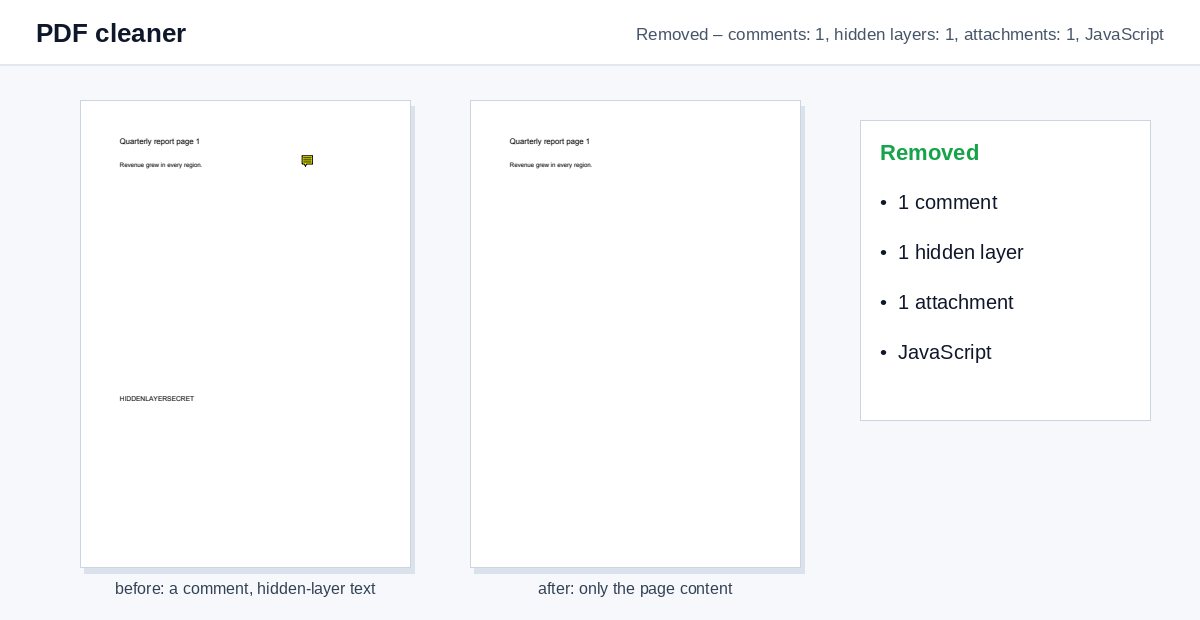
Remove what a PDF carries besides its pages – comments, hidden layers, attached files and JavaScript – and see exactly what was taken out.
How it works
Drop the PDF
Cleaning starts by itself with the safe defaults.
See what was removed
The result says what was taken out, e.g. "3 comments, 1 attachment, JavaScript".
Download the clean PDF
The pages look the same; the hidden extras are gone.
Clean metadata is step one. Controlling who reads the file is step two.
HelpRange links verify the reader's e-mail, watermark every page and can be revoked – and show you who opened the document and which pages they read.
PDFs pick up baggage on the way: review comments with internal remarks, hidden layers from CAD or design tools, a spreadsheet attached to a report, scripts in a form. None of it is visible at first glance – and all of it travels with the file to the client, the court or the other side of a deal.
What is removed – and what is not
- Comments and markup: sticky notes, highlights, strike-outs, drawings, stamps. Links stay clickable.
- Hidden layers: content on layers that are switched off (from CAD, InDesign, maps). Visible layers become ordinary page content.
- Attachments: files embedded in the PDF and paper-clip icons.
- JavaScript and actions: scripts that run when the file opens or a field changes, launch and submit actions.
- Form fields – only if you tick it; to keep the typed values, flatten instead.
Before you send a PDF outside
Run the PDF security check to see everything a file reveals, clean it here, and remove the author and software with Remove PDF metadata. Text that must not be read needs real redaction, not just a clean file.
Example: a contract after review
A contract went through two rounds of comments, and the final PDF still carries 14 comments and an attached spreadsheet with internal pricing. Drop it here: the result reports “14 comments, 1 attachment” and the clean file goes to the client without them.
PDF cleaner – questions
What does the cleaner remove?
Comments, highlights and other markup; content on hidden layers; embedded files and attachment icons; JavaScript and actions that run when the file opens. Form fields only if you tick it.
Does the visible content change?
No – the pages look the same. Only hidden layers that were switched off are removed; layers you could see become normal page content.
Do you keep my file?
Only for a short time: uploads are deleted right after processing, the result after 30 minutes – or at once with “Delete now”.
Is a cleaned PDF safe to open?
Removing JavaScript and actions takes away the usual ways a PDF runs code, but it is not a virus scan – open files from unknown senders with care.