Watermark a PDF – one personalised copy per recipient
Paste a list of e-mails and get a copy for each person with their address on every page – leaks become traceable. Add your text or logo, as one diagonal line or a tiled pattern, and check it in the live preview.
How it works
Choose your PDF
Up to 10 MB and 200 pages. Files are deleted within 30 minutes.
Paste the recipients
One e-mail per person (up to 20) – each gets their own copy with their address on every page and an invisible fingerprint.
Pick text, logo and layout
Add a word such as CONFIDENTIAL, your logo, one diagonal line or a tiled pattern – the preview shows page 1 as you change it.
Download
One recipient gives one PDF; several give a ZIP with one personalised file each.
Watermarks that follow every reader – automatically
HelpRange stamps each viewer's e-mail on every page when they open your link – no files to prepare per person – and shows who read which pages. Block downloads, require an NDA, revoke access any time.
A personalised watermark – the recipient's name or e-mail on every page – is the most effective deterrent against forwarding confidential PDFs: anyone who leaks the document leaks their own address with it. Use it for pitch decks, CIMs, price lists, course materials and board papers.
Why a watermark per recipient works better than “CONFIDENTIAL”
A generic “Confidential” stamp tells the reader the file is sensitive, but not who let it out. When every copy carries the reader’s own e-mail address, forwarding the PDF means forwarding your name with it – and most people stop there. If a copy still turns up somewhere, the PDF leak tracer reads the invisible fingerprint and tells you whose copy it was, even if the visible line was cropped.
Use it for investor decks, CIMs and teasers, price lists, board papers, course workbooks and anything you send to more than one outside person.
Choosing the layout
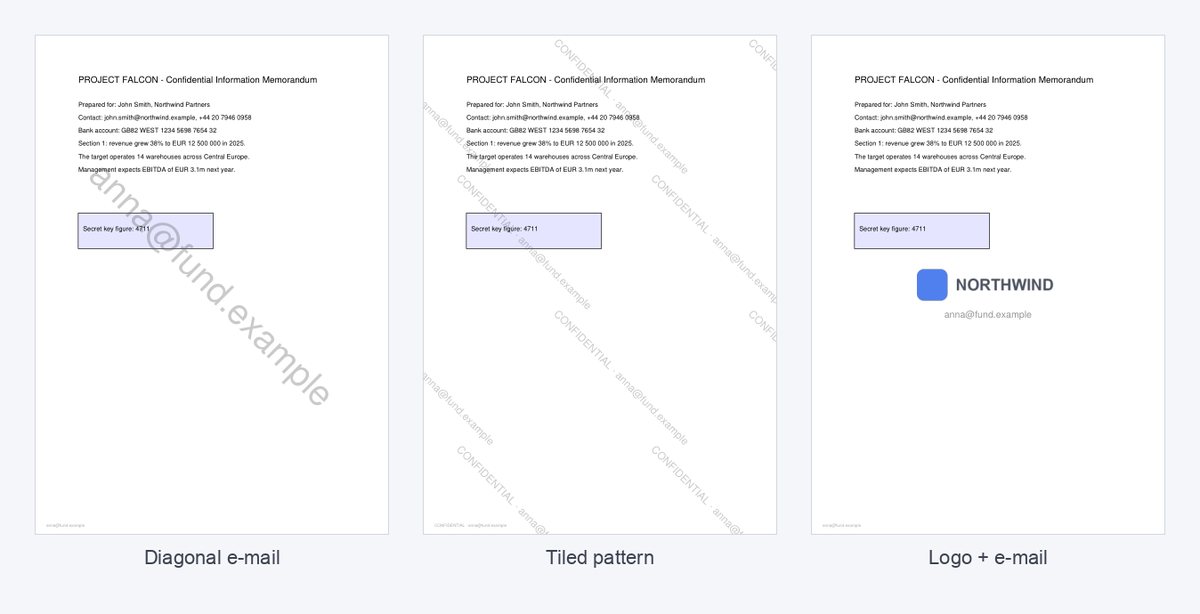
- One diagonal line is easy to read and leaves the content readable – the usual choice for decks and reports.
- Tiled pattern repeats the text across the page, so it cannot be cropped out of a screenshot of one chart or table.
- Logo brands drafts and samples; combined with an e-mail it shows both whose document it is and whose copy.
- Keep visibility at Light or Medium for documents people must read for a long time; use Strong for samples and previews.
Limits: a watermark in a downloaded file can be removed with enough effort, and it does not stop forwarding. For deals and paid content, share a view-only link instead – the watermark is applied on screen and downloads can be blocked.
Watermark a PDF – one personalised copy per recipient – questions
Is it free?
Yes – no sign-up, PDFs up to 50 MB and 20 recipients at a time.
Do you keep my file?
Only for a short time: uploads are deleted right after processing, the result after 30 minutes – or at once with “Delete now”.
Can the watermark be removed?
A watermark in a downloaded PDF can be edited out with enough effort. To prevent that, share a view-only link where the watermark is applied on screen and downloads are blocked.
Can I add a logo or image as a watermark?
Yes – upload a PNG or JPG (up to 2 MB). Transparent PNG logos look best. You can combine the logo with recipients’ e-mails or your own text.
What does the tiled watermark do?
It repeats the text or logo across the whole page in a staggered pattern, so a crop or screenshot of any part of the page still shows it.