Redact a PDF – permanently
Type names, numbers or phrases, tick all e-mails, phone numbers or IBANs, or draw boxes on the page. The content is deleted from the file, not just hidden behind a black box – and we check that it is gone.
How it works
Choose your PDF
Its pages appear in the tool so you can draw on them.
Mark what to remove
Type names and numbers, tick e-mails, phone numbers or IBANs, and drag boxes over signatures, photos or table cells.
Redact & download
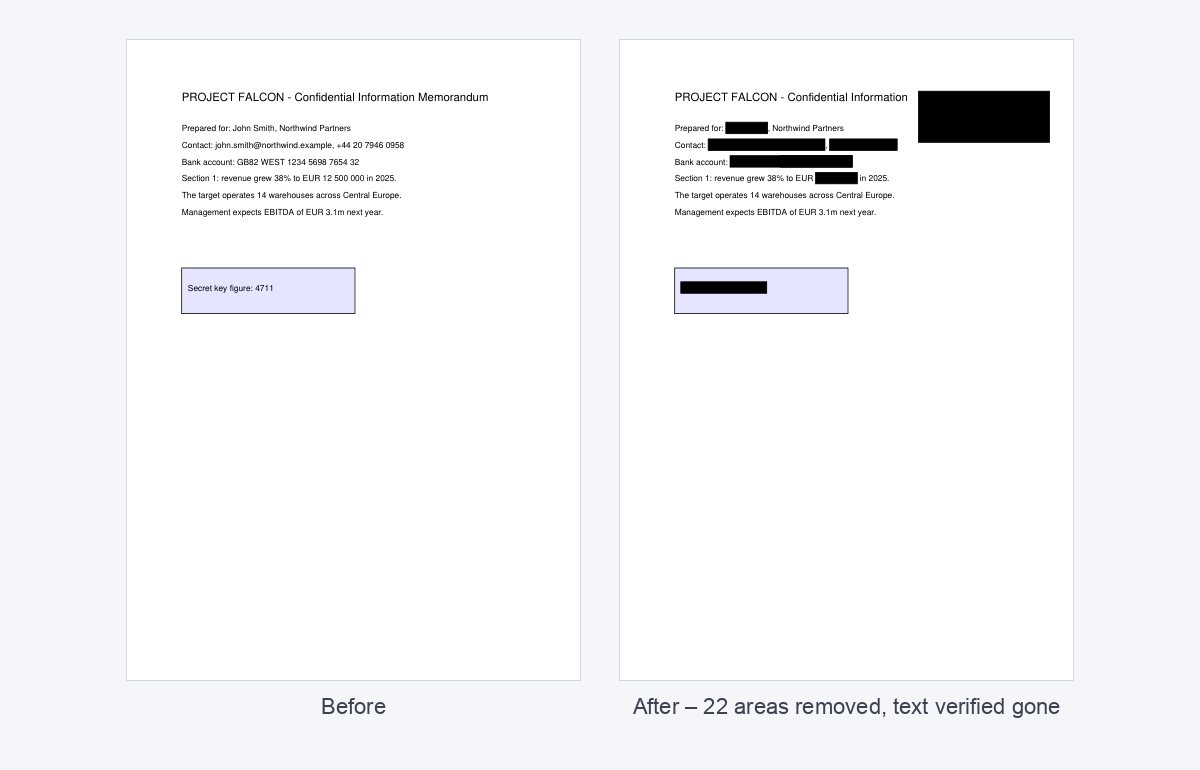
The text and image pixels under every box are deleted from the file and the metadata is cleared.
Check the verification
We open the redacted PDF again, extract its text and confirm each term is gone.
Do this inside your data room
HelpRange checks every document of a folder or data room for e-mails, phone numbers, bank and card numbers, tax IDs and names, lets you review the hits and removes them for good – existing links show the redacted version. Automatic redaction included in the $199 Deal Room Pass.
Covering text with a black rectangle in an editor is not redaction – the text is still in the file and can be copied out. Proper redaction removes it. Use it before sending contracts, statements, due diligence documents or court filings to third parties.
Real redaction vs. black boxes
Most redaction failures are not hacks: someone drew a black rectangle in Word or a PDF editor, and the text underneath was still in the file – a reader selects it and pastes it into an e-mail. True redaction deletes the characters (and the image pixels) under the box, so there is nothing left to copy, search or index. This tool does exactly that, then reads the result back and lists every term you asked to remove with a check mark – or a warning if anything is still in the text.
Not sure an existing PDF was redacted properly? Run it through the PDF security check: it flags text hidden under black boxes.
A redaction checklist
- Search for variants: “J. Smith”, “Smith’s”, initials, the e-mail address and the phone number.
- Draw boxes over signatures, stamps, photos and logos – they are images, not text, so a word search cannot find them.
- Scanned pages have no text layer: draw boxes over what must go.
- Remove what else the file reveals – comments and form fields with flatten, author and history with metadata removal.
- Keep the unredacted original somewhere safe; redaction cannot be undone.
Redact a PDF – permanently – questions
Is the text really removed?
Yes. The tool applies true redaction: the text under each black box is deleted from the PDF and the metadata is cleared, so it cannot be copied or searched.
Does it redact scanned pages?
Word and pattern search works only on text the PDF actually contains. On scanned pages without a text layer, draw boxes over what must go – the image pixels under each box are blanked out.
Do you keep my file?
Only for a short time: uploads are deleted right after processing, the result after 30 minutes – or at once with “Delete now”.
Can I redact by drawing a box?
Yes. After you choose the PDF its pages appear in the tool: drag across any area to black it out and click a box to remove it. Text and image pixels under the box are deleted. Boxes can be drawn on the first 30 pages.
How do I know the redaction worked?
After redacting, the tool extracts the text of the new file and shows, for every word or pattern you entered, whether it can still be found – and whether your drawn boxes still contain any text.