Convert Markdown to Word
Paste Markdown or drop a .md file and get an editable Word document with real headings, lists and tables.
How it works
Paste Markdown or drop a .md file
A dropped file is converted at once; for pasted text press the button.
We build a real Word document
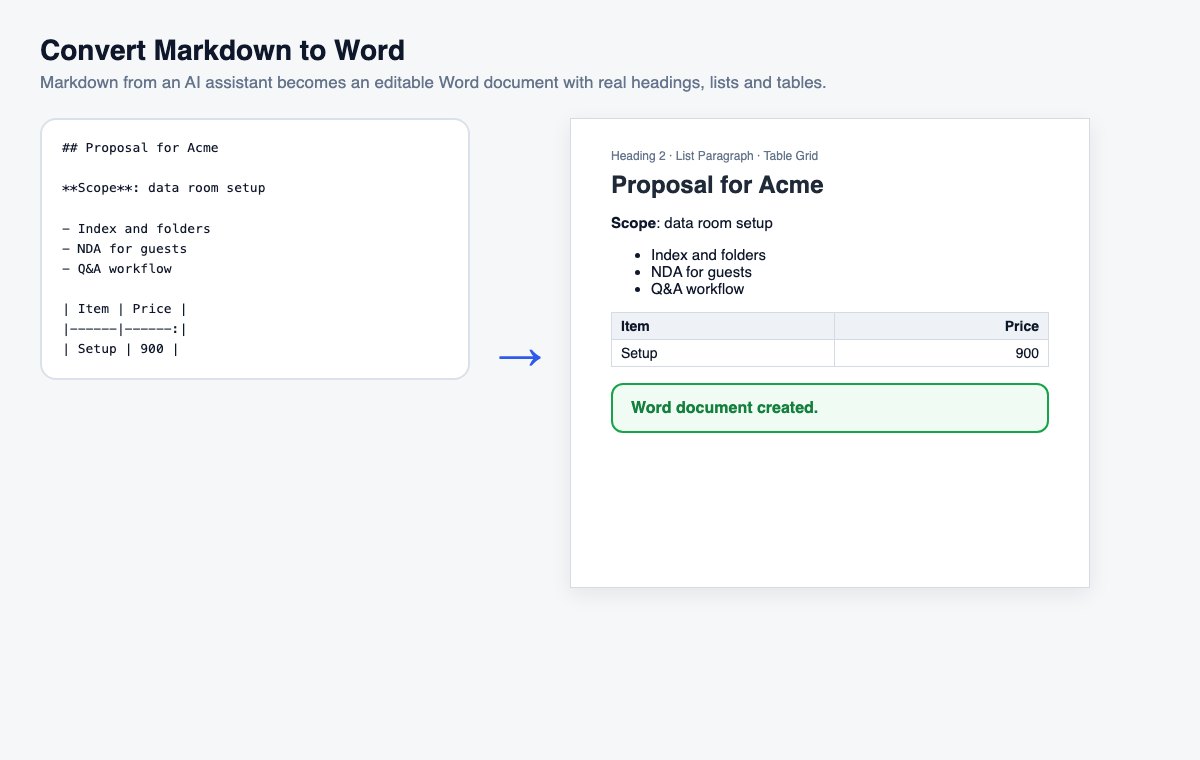
Heading styles, Word lists, tables with a header row, code and links.
Download the .docx
Open it in Word, Google Docs or LibreOffice and keep editing.
Skip the conversion: share Office files directly
HelpRange opens Word, PowerPoint and Excel files in the browser with page analytics and watermarks – upload the original and send one secure link.
Many documents start as Markdown – notes, specifications, AI drafts – but have to be finished in Word: for comments, tracked changes, a company template or a client who only uses Office. Converting keeps the structure, so nothing has to be formatted again by hand.
From an AI draft to a Word document
AI assistants answer in Markdown. Pasted straight into Word, the answer is full of asterisks and hash signs; converted here, the headings become Word headings, the lists real lists and the tables real tables – ready for your template, comments and tracked changes. Need a PDF instead? Use Markdown to PDF.
What happens to each Markdown element
Headings become Heading 1 to Heading 6, so Word’s navigation pane and automatic table of contents pick them up. Bulleted and numbered lists become Word lists that keep numbering as you edit, nested lists become deeper list levels. Tables get borders, a shaded header row that repeats on every page, and the column alignment from the Markdown. Code blocks use a monospaced font on a light background, quotes get a grey bar on the left, and links stay clickable. Raw HTML inside the Markdown is cleaned up, and images appear as their description, because nothing is downloaded.
Convert Markdown to Word – questions
Will it look like a normal Word document?
Yes – headings use Word’s Heading styles (so the navigation pane and a table of contents work), lists are real Word lists, tables have borders and a header row, code uses a monospaced font.
Can I paste an answer from ChatGPT or Claude?
Yes. Copy the answer as Markdown (most assistants have a copy button that keeps the formatting marks), paste it here and you get a formatted Word document instead of asterisks and hash signs.
Do you keep my file?
Only for a short time: uploads are deleted right after processing, the result after 30 minutes – or at once with “Delete now”.