Convert Excel to CSV
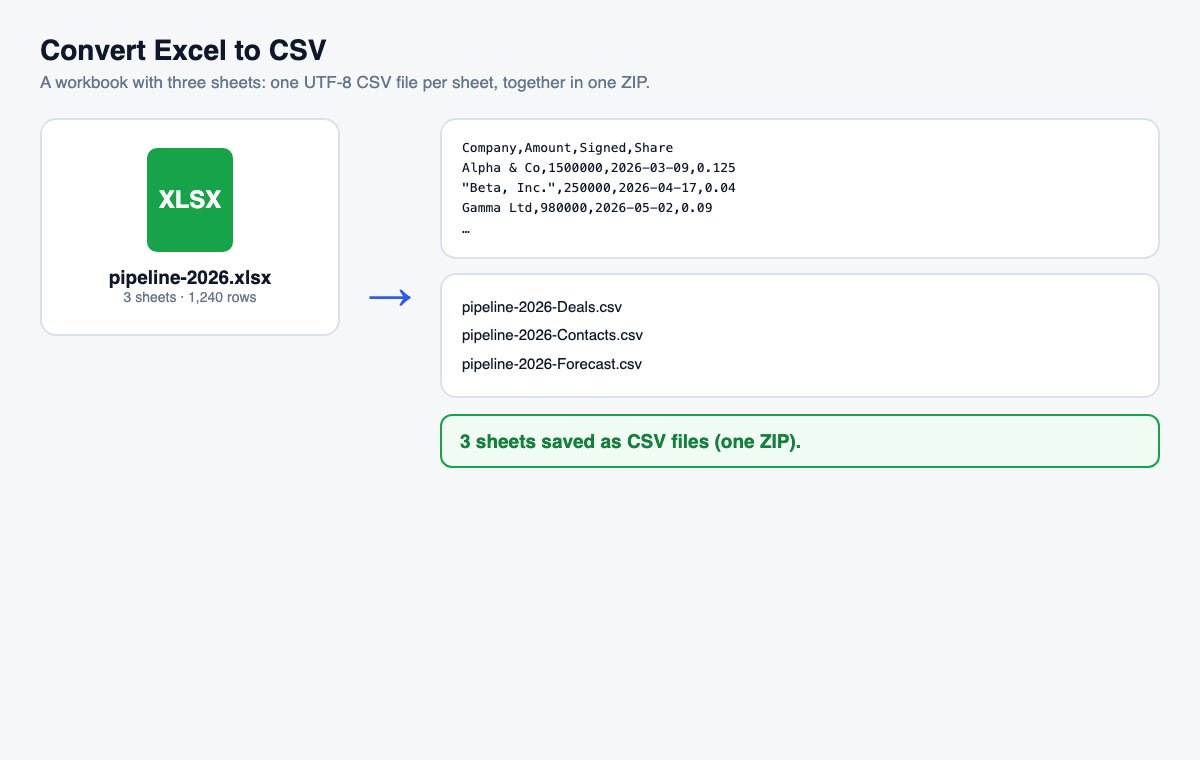
Drop an .xlsx file and get a clean UTF-8 CSV – one file per sheet, in a ZIP when the workbook has several.
How it works
Drop the Excel file
The conversion starts by itself – every visible sheet is converted.
Pick options if you need them
Under “More options”: one sheet only, a semicolon or tab separator, or a BOM so that old Excel versions read accents right.
Download
One sheet gives one CSV file; several sheets give a ZIP with one CSV each.
Skip the conversion: share Office files directly
HelpRange opens Word, PowerPoint and Excel files in the browser with page analytics and watermarks – upload the original and send one secure link.
CSV is the format every database, CRM, accounting program and script can import. Converting the workbook here gives you plain UTF-8 files with the separator your system expects – no Excel needed, and no accented letters turned into question marks.
Comma or semicolon?
Use a comma for most programs and for anything international. Systems set to a European locale (Polish, German, French…) often expect a semicolon, because there the comma is the decimal separator. Numbers are always written with a dot as the decimal point and without thousands separators, so they import as numbers everywhere. Dates become 2026-11-14 – a format every system reads the same way.
What a CSV file keeps – and what it leaves out
A CSV file is plain text: one line per row, the cells separated by a comma or semicolon. It keeps the values you see in the cells, but nothing else – no formulas, formatting, colours, comments, charts, filters or merged cells, and only one sheet per file. That is exactly why databases and import tools prefer it: there is nothing to misread. Keep the .xlsx as your working copy, and convert again whenever the data changes. Hidden sheets are not exported unless you name them under “More options”, so a sheet you hid on purpose does not slip into an export by accident.
Convert Excel to CSV – questions
What happens with several sheets?
Every visible sheet becomes its own CSV file, named after the sheet, and you download them together as one ZIP. To get one sheet only, type its name or number under “More options”.
Are formulas kept?
A CSV file holds values only: you get the results Excel last calculated and saved, not the formulas. Dates are written as 2026-11-14, numbers without thousands separators.
Do you keep my file?
Only for a short time: uploads are deleted right after processing, the result after 30 minutes – or at once with “Delete now”.