Your next offer, drafted from your last one
Upload your last offer, describe the new one – AI writes a draft with the same sections and a price table. You check it, see the PDF and the client’s offer page, and confirm. Then copy the link or send it by e-mail – and see when the client opens, accepts or asks for contact.
Starts from your own offer
Upload a previous offer or template (PDF or Word) or pick a document already in HelpRange, then write what the new offer should contain.
Prices only from you
Prices, dates and discounts come only from your prompt and template. Anything else is highlighted for checking, and totals are calculated by HelpRange, not by the AI.
Change any section with one instruction
“Make the timeline shorter”, “add a support package” – the AI rewrites that section and you see what changed.
See it before it exists
You see the PDF – with your logo and colour – and the client’s offer page before anything is created.
Nothing without your confirmation
Nothing is created or sent without your confirmation; sending by e-mail needs a second confirm after a full preview.
Only your client opens it
By default the offer opens only for your client’s e-mail – or also for colleagues at their company domain, or for anyone. The client confirms the e-mail with a code, then can accept the offer or ask for contact, and you see their engagement score.
From your last offer to a tracked link
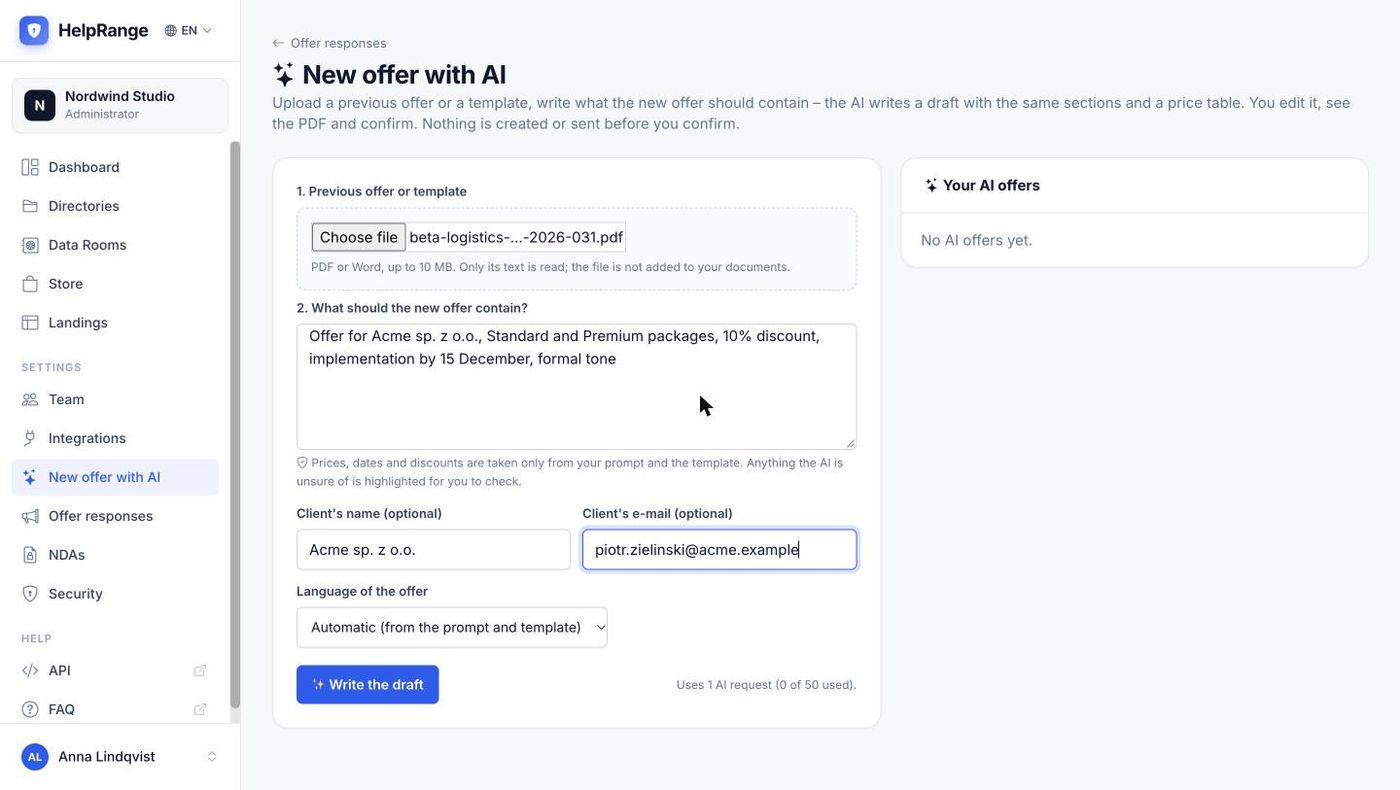
1. Your last offer and a prompt
The template’s text is read; the file is not added to your documents. Client’s name and e-mail are optional.
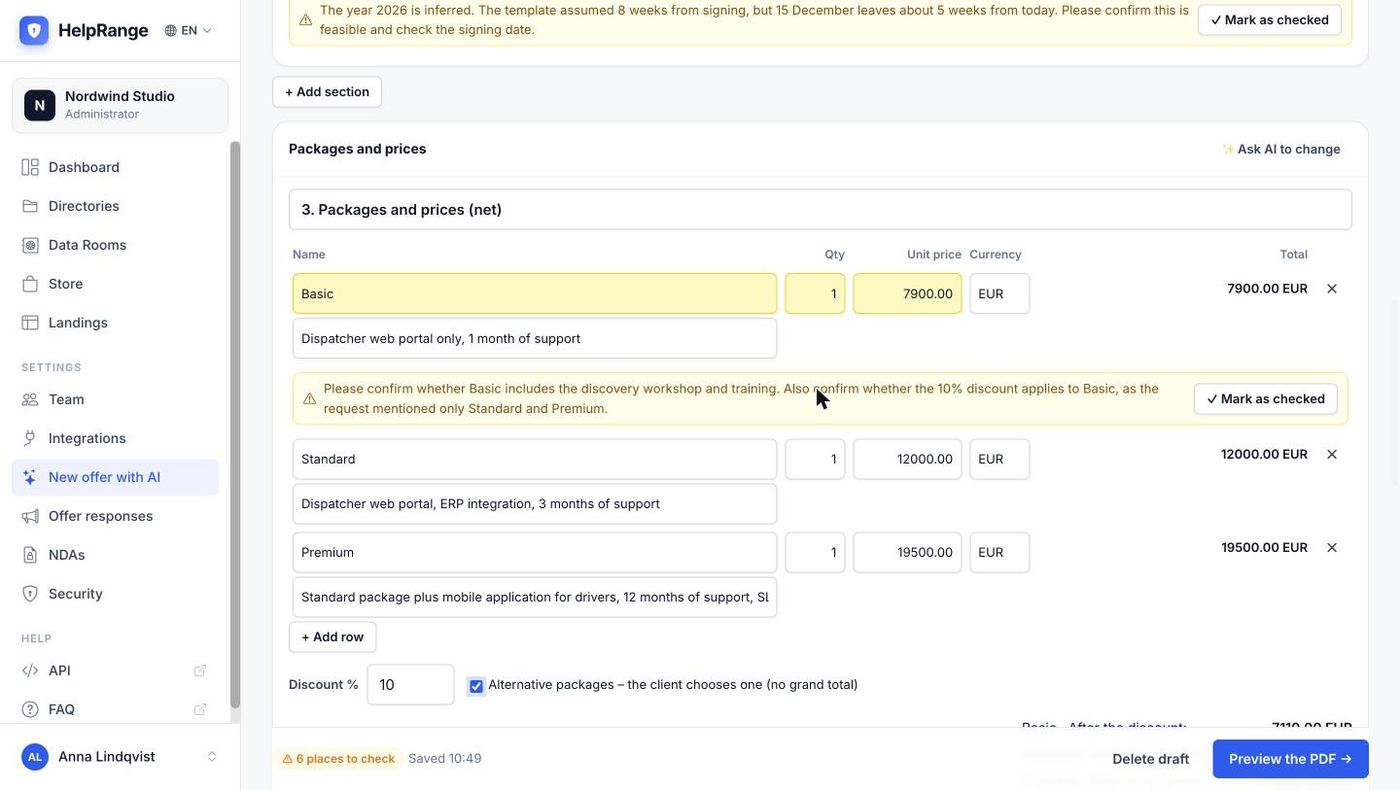
2. A draft with places to check
Sections and a price table like your template’s. Numbers the AI could not find in your prompt or template are highlighted until you mark them as checked.
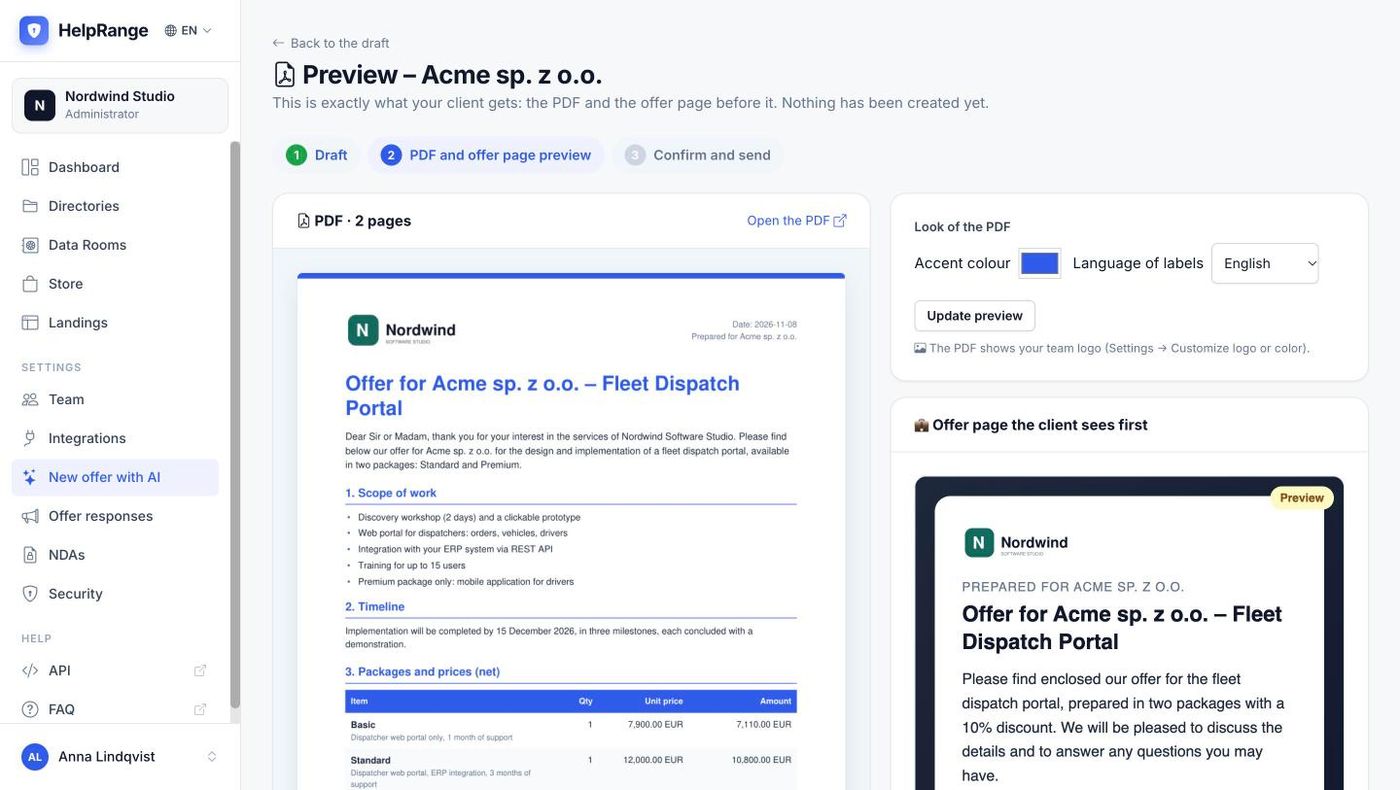
3. The PDF and the offer page, before anything is created
Your logo and accent colour on the PDF; next to it the page the client sees first.
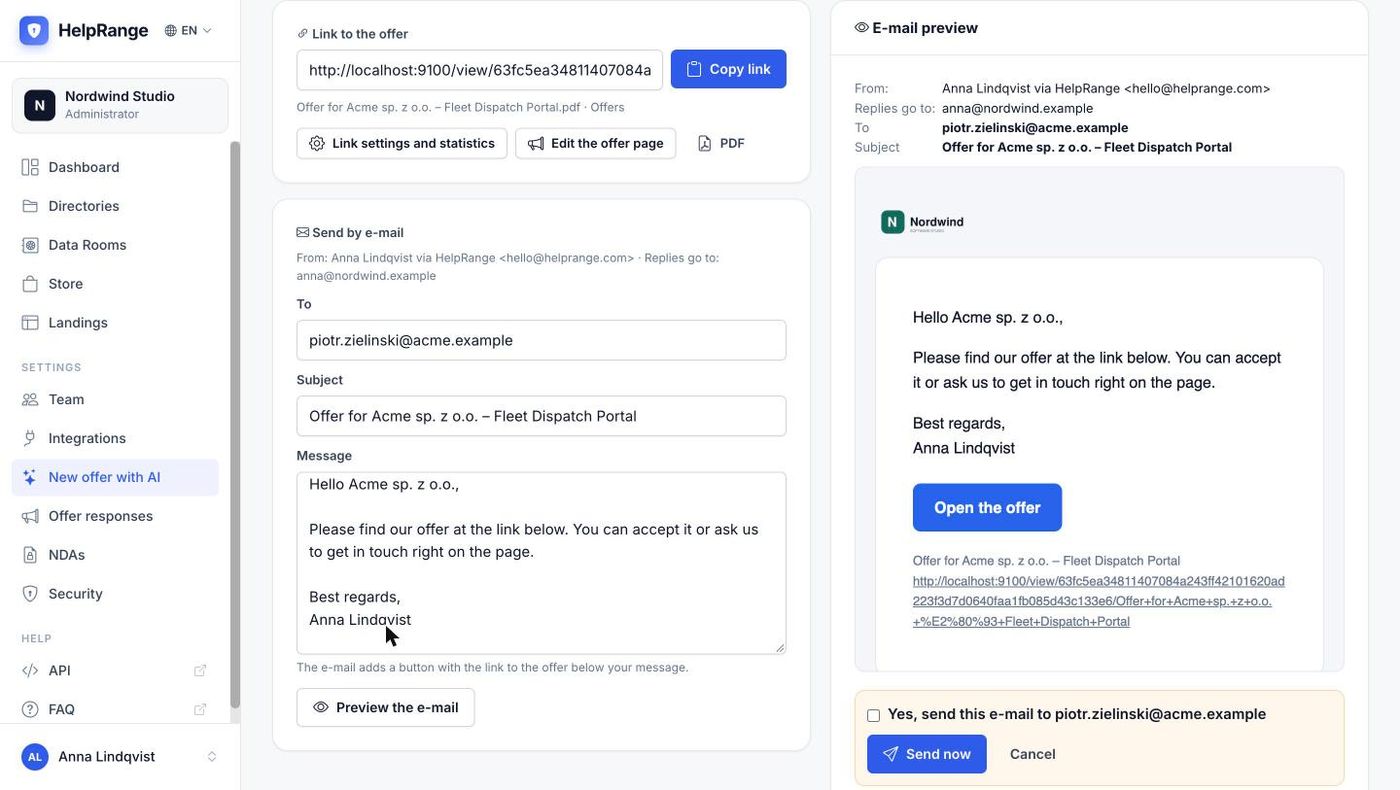
4. Copy the link or send it – after a second confirm
The e-mail is shown exactly as it will be sent, “you via HelpRange”, with replies going to you.
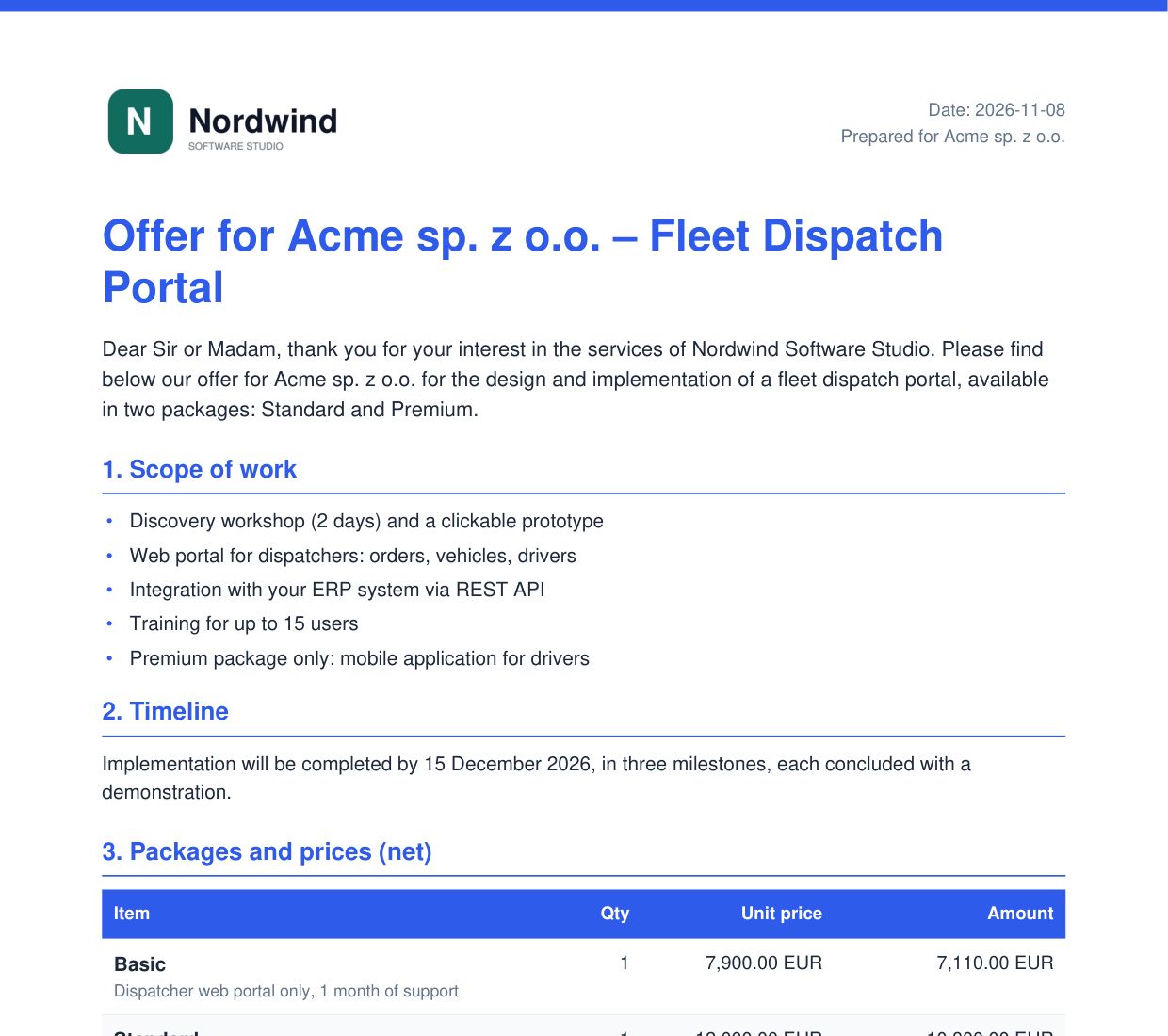
The generated PDF
A clean layout with your logo, the sections and the price table with the totals calculated by HelpRange.
A normal HelpRange document once it is confirmed
Every page tracked
The PDF is stored like any document: who opened it, time on every page, heatmaps and replay.
Protections apply
Watermark, download blocking, expiry and automatic redaction work on the generated offer as on any upload.
Sent as you
The e-mail goes out as “Your Name via HelpRange” and replies come to your own inbox.
In your client’s language
The generator works in 25 interface languages; the fixed PDF labels (item, quantity, total …) come in English, Polish, German, French, Spanish, Italian, Portuguese and Dutch.
Offer responses in one place
Every generated offer and every answer – accepted or contact requested – is listed in Offer responses.
A PDF or Word file, or a document already in HelpRange – plus a few lines on what the new offer should contain.
Edit the draft, clear the highlighted places, change any section with one instruction, and see the PDF and the offer page.
Confirm to create the document and the link, then copy it or send it by e-mail after a second confirm.
The AI offer generator is part of Pro ($39 per team per month) and every higher plan, and the 3-day trial. Every draft and every section change uses one AI request: 50 a month on Pro, 100 on Unlimited. Plans & pricing
AI offer generator – questions
Which templates can I upload?
PDF and Word files (also ODT, RTF and TXT) up to 10 MB, or a document already in HelpRange. Only the text is read: scanned PDFs without a text layer cannot be used, and the PDF is laid out in HelpRange’s own clean template – it does not copy your template’s design.
Can the AI invent prices?
Prices, dates and discounts come only from your prompt and template. Any number the AI could not find there is highlighted for you to check, and the totals are always calculated by HelpRange.
Is anything sent automatically?
No. Nothing is created before you confirm the preview, and an e-mail is sent only after a second confirm of exactly the message you previewed. There are no automatic follow-ups.
What does the client get?
A link to the PDF with an offer page in front of it. By default only the client’s e-mail can open it (you can also allow their company domain, or anyone). The client confirms their e-mail with a code, reads the offer and can click “Accept offer” or “Request contact”; you see their engagement score.
Can the client sign or pay inside the offer?
No. HelpRange records the acceptance; e-signature and payments are not part of the offer. Use your contract or invoicing tool for those.
In which languages?
The generator’s screens are in 25 languages and the AI writes in the language you choose. The fixed labels in the PDF are translated into 8 languages (English, Polish, German, French, Spanish, Italian, Portuguese, Dutch); other languages use English labels.
How much does it cost?
It is included in Pro ($39 per team per month) and higher plans. Each draft or section change counts as one AI request: 50 a month on Pro, 100 on Unlimited.
Try it on your own documents
3-day free trial, then a free plan. No credit card required.
Start free trial