Know who has read and accepted every document
Turn on acknowledgement in a data room and every document shows an “I have read and accept” button. You see who confirmed which version and when, remind those who have not, and export the log as evidence – for deal documents, HR policies and compliance.
Your whole team, unlimited guests, one price. Or $199 for a single deal. No sales call.
Unlimited is $174 a month for your whole team – data rooms, NDA before access, AI Q&A. The Deal Room Pass is $199 once for 90 days and never renews. Sign up and pay by card.
“I have read and accept” on every document
Guests confirm each document in the viewer with one click. Choose all documents of the room or only the ones that matter.
Only after reading every page
Optionally, the button works only once the guest has opened every page of the document – no accepting a 40-page policy from the cover.
A new version needs a new confirmation
Upload a corrected file to the same link and earlier confirmations are marked “pending – new version” until the guest reads and accepts it again.
Guests × documents at a glance
One table shows every guest against every document: acknowledged with date and time, pending, or pending after a new version.
CSV evidence
Download the log: document, version, guest e-mail, time, IP address and country – plus every confirmation ever given, older versions included.
Reminders in the reader’s language
Remind one guest or all pending guests with one click; the e-mail goes out in your readers’ language, at most once a day per guest.
What your guests see – and what you see
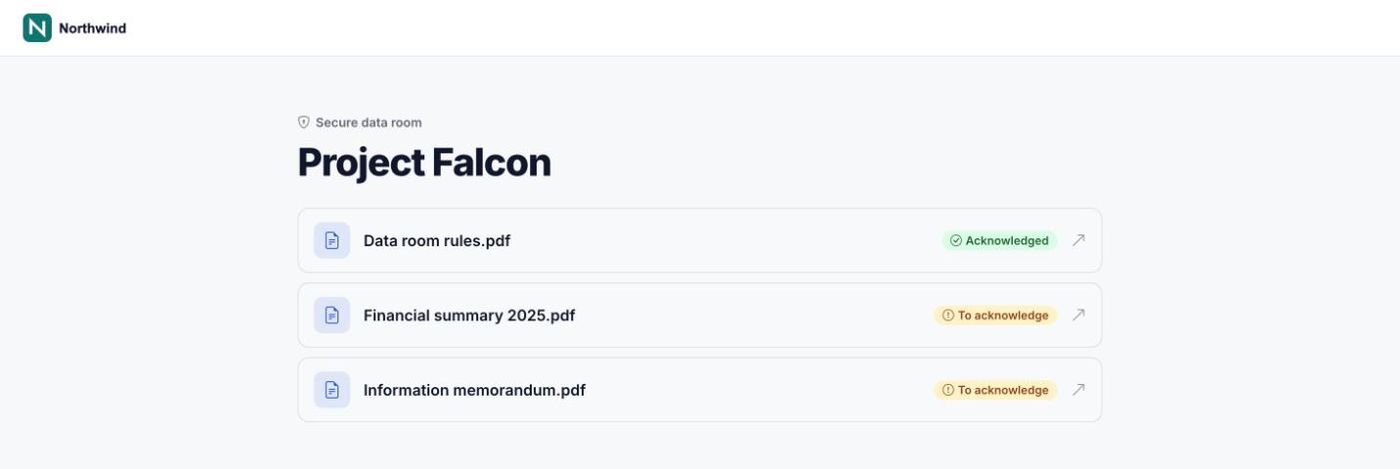
The guest sees what is still to acknowledge
Each document in the room shows “Acknowledged” or “To acknowledge”, so guests know what is left.
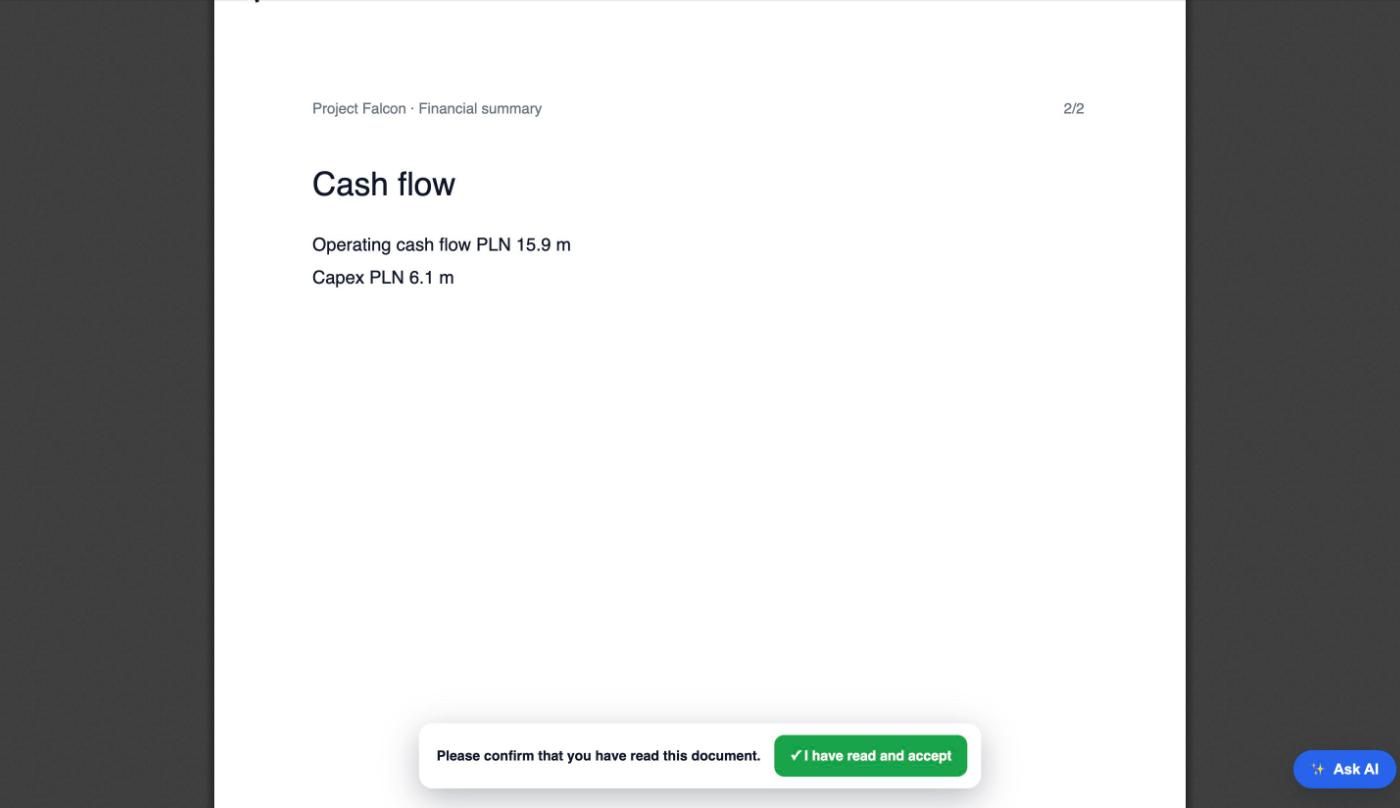
“I have read and accept” in the viewer
The confirmation sits under the document. With the all-pages rule on, it unlocks after the last page.
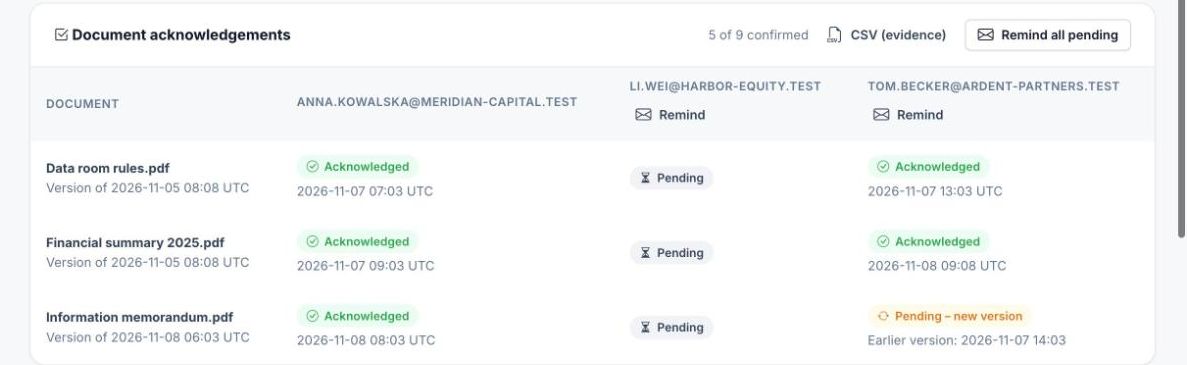
Who confirmed which version
Documents against guests, with the time of each confirmation, “Remind” per guest, “Remind all pending” and the CSV export.
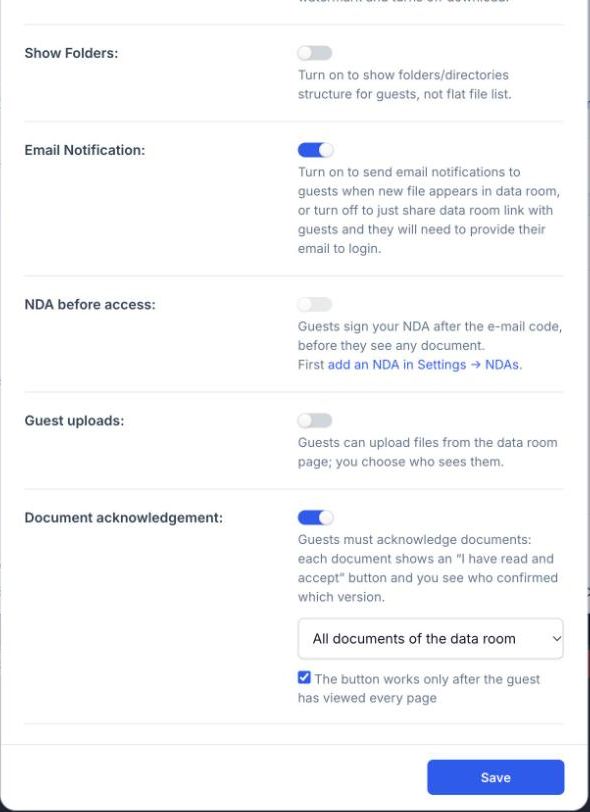
One switch in the room settings
Turn it on when you create the room or later in Settings: all documents or chosen ones, and whether every page must be viewed first.
Where teams use it
Deal documents
Buyers confirm the process letter, data room rules and key disclosures before they bid – and you know the confirmation covers the current version.
HR policies
Employees or contractors confirm the code of conduct, security policy or handbook; a new edition asks everyone again.
Compliance and audits
Show an auditor who read and accepted which procedure, when and from where, with one CSV.
Partners and franchisees
Distributors, franchisees or subcontractors confirm the terms, price lists and manuals you share with them.
With every protection of the room
Acknowledgement works next to the NDA before access, watermarks with the guest’s e-mail, download blocking and activity reports.
Upload the documents and invite guests by e-mail; each guest confirms their e-mail with a code.
When you create the room or in its Settings: all documents or chosen ones, with or without the all-pages rule.
Watch the table fill up, remind pending guests and download the CSV when you need evidence.
Document acknowledgement is part of Unlimited ($174 per team per month, $139 billed yearly) and the Deal Room Pass ($199 once for one 90-day deal), and you can try it in the 3-day trial. Unlimited users and guests. Plans & pricing
Document acknowledgement – questions
What exactly does the guest confirm?
The guest clicks “I have read and accept” under the document. HelpRange records the guest’s verified e-mail, the time, IP address, country, browser and the version of the document they confirmed.
Can I require guests to read the whole document first?
Yes. Tick “The button works only after the guest has viewed every page” and the confirmation unlocks only when every page of the current version has been opened.
What happens when I upload a new version?
Upload the new file to the same link and every earlier confirmation of that document turns into “pending – new version”. Guests see the document as “To acknowledge” again; the CSV keeps the old confirmations.
Can I choose which documents need acknowledgement?
Yes: all documents of the room, or only the ones you pick – for example the data room rules and the process letter.
Are reminders sent automatically?
No. You send reminders yourself – to one guest or to everyone pending – at most once a day per guest. The e-mail is written in your readers’ language.
Is an acknowledgement an electronic signature?
No. It is a recorded confirmation that the guest read and accepted the document – who, when, which version and from where. For a signed agreement before access, use the NDA step of the data room.
Which plans include it?
Unlimited, the Deal Room Pass and the 3-day trial. Pro data rooms do not have it.
Try it on your own documents
3-day free trial, then a free plan. No credit card required.
Start free trial