Check an Office file before sending
Drop a Word, Excel or PowerPoint file and see what the recipient could find in it – tracked changes, comments, hidden sheets, speaker notes, names – then clean it in one click.
How it works
Drop the Word, Excel or PowerPoint file
The check starts by itself and takes a second.
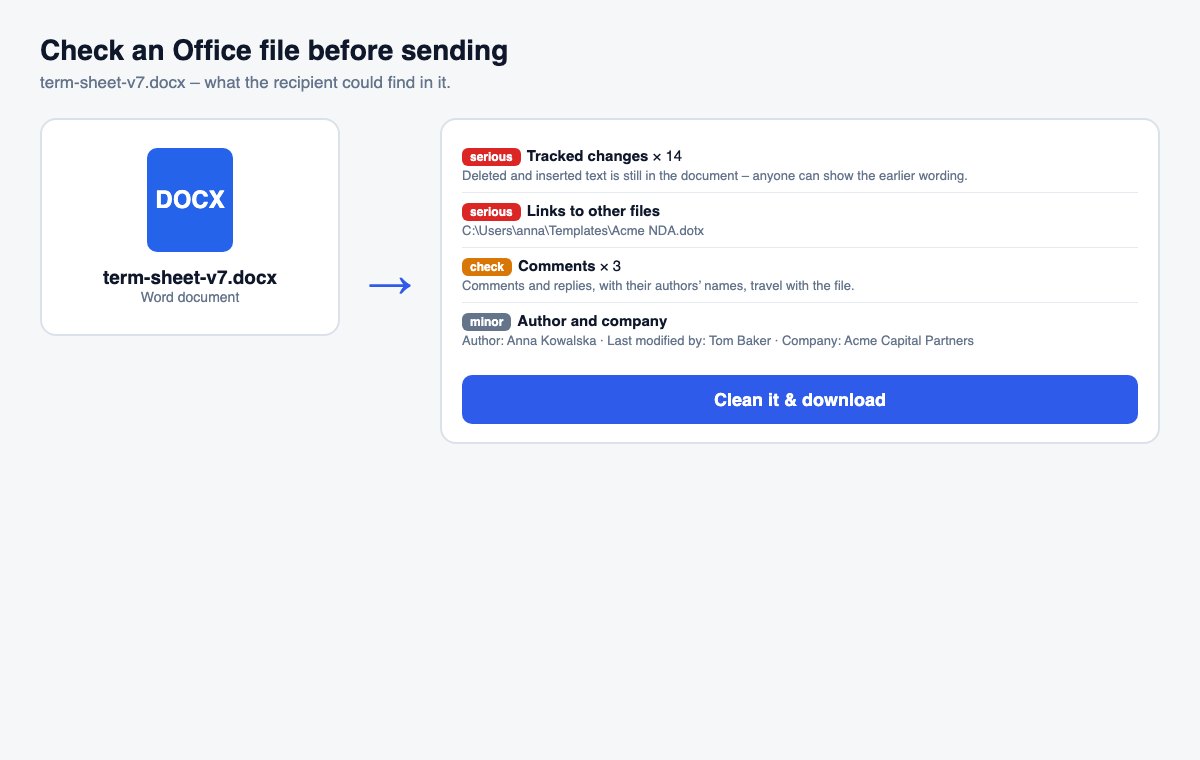
Read the findings
Each finding says what was found, where, and why it matters – most serious first.
Clean it in one click
Comments, names and custom data are removed; tick tracked changes, hidden slides or notes to remove them too.
Clean metadata is step one. Controlling who reads the file is step two.
HelpRange links verify the reader's e-mail, watermark every page and can be revoked – and show you who opened the document and which pages they read.
Most embarrassing leaks are not hacks but attachments: a term sheet with the earlier price still in the tracked changes, a model with the “real” numbers on a hidden sheet, a pitch deck with notes for the presenter. A quick check before sending finds them while they can still be removed.
What the findings mean
- Tracked changes keep every deleted word in the file – the earlier price, a removed clause, a colleague’s wording. Accept them before sending a final version.
- Hidden and very hidden sheets are a classic: the workings behind a model, a price floor, a list of other bidders. Excel does not even list very hidden sheets under Unhide.
- Speaker notes travel with the deck when you send the .pptx – send a PDF or remove them.
- Links to other files show the names and folders of files on your computer or network.
A routine for every outgoing document
Run the check on the exact file you are about to attach – not on an earlier copy – especially for term sheets, offers, financial models, board decks and anything that went through several reviewers. Fix what the cleaner cannot do for you: unhide and delete sheets, rows and columns that should not leave the company, break links to other files (Data › Edit Links in Excel) and save without macros. Then run the check once more. If the recipient only needs to read the document, sending a PDF, or a view-only link that cannot be downloaded, removes most of these risks at once.
Check an Office file before sending – questions
What does the check look for?
Tracked changes and comments, hidden and “very hidden” sheets, hidden rows and columns, hidden slides and speaker notes, the author, last editor and company in the file properties, links to files on your computer or network, embedded files, macros and custom data from other programs.
What does “Clean it” remove?
Comments, author and company details and custom data – always. Tracked changes are accepted, and hidden slides or speaker notes removed, only when you tick them. Hidden sheets, rows and links are reported but left for you to fix in Office, because deleting them could break formulas.
Do you keep my file?
The file is checked and deleted right away – unless you click “Clean it”: then it is kept for up to 30 minutes so it does not have to be uploaded again, and the clean copy is deleted after 30 minutes too.